Featured image of post CenOS7安装GitLab(使用外部Nginx配置)

CenOS7安装GitLab(使用外部Nginx配置)

CenOS7安装GitLab(使用外部Nginx配置)

本文讲解在CentOS7系统中安装GitLab(使用外部Nginx配置)。

实验环境

  • server服务端: 操作系统为CentOS 7.6,IP:192.168.56.14, git:2.16.5。

查看server服务端信息:

1
2
3
4
5
6
[root@server ~]# cat /etc/centos-release
CentOS Linux release 7.6.1810 (Core) 
[root@server ~]# ip a show|grep 192
inet 192.168.56.14/24 brd 192.168.56.255 scope global noprefixroute enp0s3
[root@server ~]# git --version
git version 2.16.5

配置要求

配置要求参考https://docs.gitlab.com/ce/install/requirements.html

  • 系统支持:支持Ubuntu、Debian、CentOS、openSUSE、Red Hat,不支持Arch Linux、Fedora、FreeBSD、Gentoo、macOS、 Windows (官方未计划支持)。
  • Ruby版本:Ruby (MRI) 2.5。
  • 硬件要求:存储,建议使用LVM或者支持NFS协议(network file system protocol)的NAS或SAN网络存储设备。
  • 硬件要求:CPU,推荐500用户时使用2 cores,2000用户时使用4 cores。
  • 硬件要求:内存,推荐100用户时使用8GB RAM,2000用户时使用16GB RAM;推荐使用SWAP交换分区。
  • 数据库:PostgreSQL 9.6,建议至少5-10GB的可用存储空间。
  • Unicorn Workers:工人数,推荐工人数 = CPU cores + 1 。
  • GitLab Runner:如果有多台服务器的话,不建议将GitLab Runner安装在GitLab服务器上,运行GitLab Runner可能消耗大量内存。
  • 浏览器支持:Firefox、Chrome、Safari、Microsoft Edge、Internet Explorer 11。

准备工作

设置服务器时间为Asia/Shanghai,并同步一下时间:

 1
 2
 3
 4
 5
 6
 7
 8
 9
10
[root@server ~]# mv /etc/localtime /etc/localtime.bak
[root@server ~]# ln -s /usr/share/zoneinfo/Asia/Shanghai  /etc/localtime
[root@server ~]# date
Sat Jun 22 15:34:05 CST 2019
[root@server ~]# echo "sync to cn.ntp.org.cn with time5.aliyun.com IP:182.92.12.11"
sync to cn.ntp.org.cn with time5.aliyun.com IP:182.92.12.11
[root@server ~]# ntpdate 182.92.12.11
22 Jun 15:34:28 ntpdate[14920]: step time server 182.92.12.11 offset 0.791964 sec
[root@server ~]# date
Sat Jun 22 15:34:31 CST 2019

安装GitLab

参考https://about.gitlab.com/install/#centos-7在CentOS7上面安装Omnibus package。

安装依赖

安装必要依赖,并开启防火墙放行80端口:

 1
 2
 3
 4
 5
 6
 7
 8
 9
10
11
12
13
14
15
16
17
18
19
20
21
22
23
24
25
26
27
28
29
30
31
32
33
34
35
36
37
38
39
40
41
42
43
44
45
46
47
48
49
50
51
52
53
54
55
56
57
58
59
60
61
62
63
## 说明:安装依赖
[root@server ~]# yum install curl policycoreutils-python openssh-server -y

## 说明:开机启动sshd服务并启动
[root@server ~]# systemctl enable sshd
[root@server ~]# systemctl start sshd
[root@server ~]# systemctl status sshd
● sshd.service - OpenSSH server daemon
   Loaded: loaded (/usr/lib/systemd/system/sshd.service; enabled; vendor preset: enabled)
   Active: active (running) since Sat 2019-06-22 09:50:43 CST; 4h 51min ago
     Docs: man:sshd(8)
           man:sshd_config(5)
 Main PID: 3193 (sshd)
    Tasks: 1
   Memory: 3.4M
   CGroup: /system.slice/sshd.service
           └─3193 /usr/sbin/sshd -D

Jun 22 09:50:42 server.hopewait systemd[1]: Starting OpenSSH server daemon...
Jun 22 09:50:43 server.hopewait sshd[3193]: Server listening on 0.0.0.0 port 22.
Jun 22 09:50:43 server.hopewait sshd[3193]: Server listening on  port 22.
Jun 22 09:50:43 server.hopewait systemd[1]: Started OpenSSH server daemon.
Jun 22 11:59:11 server.hopewait sshd[13692]: Accepted password for root from 192.168.56.1 port 55574 ssh2

## 说明:查看防火墙放行列表
[root@server ~]# firewall-cmd --list-all
public (active)
  target: default
  icmp-block-inversion: no
  interfaces: enp0s3 enp0s8
  sources: 
  services: ssh dhcpv6-client
  ports: 8140/tcp 53/tcp 11211/tcp
  protocols: 
  masquerade: no
  forward-ports: 
  source-ports: 
  icmp-blocks: 
  rich rules: 

## 说明:防火墙放行80端口
[root@server ~]# firewall-cmd --zone=public --add-port=80/tcp --permanent
success

## 说明:重启防火墙
[root@server ~]# firewall-cmd --reload
success

## 说明:查看防火墙放行列表
[root@server ~]# firewall-cmd --list-all
public (active)
  target: default
  icmp-block-inversion: no
  interfaces: enp0s3 enp0s8
  sources: 
  services: ssh dhcpv6-client
  ports: 8140/tcp 53/tcp 11211/tcp 80/tcp
  protocols: 
  masquerade: no
  forward-ports: 
  source-ports: 
  icmp-blocks: 
  rich rules: 

新增GitLab的国内清华大学的yum源

新建/etc/yum.repos.d/gitlab-ce.repo,内容如下:

1
2
3
4
5
[gitlab-ce]
name=Gitlab CE Repository
baseurl=https://mirrors.tuna.tsinghua.edu.cn/gitlab-ce/yum/el\$releasever/
gpgcheck=0
enabled=1

使用以下命令添加数据:

 1
 2
 3
 4
 5
 6
 7
 8
 9
10
11
12
13
14
[root@server ~]# cat > /etc/yum.repos.d/gitlab-ce.repo << EOF
> [gitlab-ce]
> name=Gitlab CE Repository
> baseurl=https://mirrors.tuna.tsinghua.edu.cn/gitlab-ce/yum/el\$releasever/
> gpgcheck=0
> enabled=1
> EOF
[root@server ~]# cat /etc/yum.repos.d/gitlab-ce.repo 
[gitlab-ce]
name=Gitlab CE Repository
baseurl=https://mirrors.tuna.tsinghua.edu.cn/gitlab-ce/yum/el$releasever/
gpgcheck=0
enabled=1
[root@server ~]#

查找yum源中gitlab-ce的版本:

 1
 2
 3
 4
 5
 6
 7
 8
 9
10
11
12
13
14
15
16
17
18
19
20
21
22
23
24
[root@server ~]# yum list gitlab-ce --showduplicates
Loaded plugins: fastestmirror
Loading mirror speeds from cached hostfile
 * base: mirrors.163.com
 * centos-sclo-rh: mirrors.cn99.com
 * epel: mirrors.tuna.tsinghua.edu.cn
 * extras: ap.stykers.moe
 * updates: mirrors.cn99.com
Available Packages
gitlab-ce.x86_64                                                     7.10.0~omnibus-1                                                       gitlab-ce
.... 省略
gitlab-ce.x86_64                                                     11.9.11-ce.0.el7                                                       gitlab-ce
gitlab-ce.x86_64                                                     11.9.12-ce.0.el7                                                       gitlab-ce
gitlab-ce.x86_64                                                     11.10.0-ce.0.el7                                                       gitlab-ce
gitlab-ce.x86_64                                                     11.10.1-ce.0.el7                                                       gitlab-ce
gitlab-ce.x86_64                                                     11.10.2-ce.0.el7                                                       gitlab-ce
gitlab-ce.x86_64                                                     11.10.3-ce.0.el7                                                       gitlab-ce
gitlab-ce.x86_64                                                     11.10.4-ce.0.el7                                                       gitlab-ce
gitlab-ce.x86_64                                                     11.10.5-ce.0.el7                                                       gitlab-ce
gitlab-ce.x86_64                                                     11.10.6-ce.0.el7                                                       gitlab-ce
gitlab-ce.x86_64                                                     11.11.0-ce.0.el7                                                       gitlab-ce
gitlab-ce.x86_64                                                     11.11.1-ce.0.el7                                                       gitlab-ce
gitlab-ce.x86_64                                                     11.11.2-ce.0.el7                                                       gitlab-ce
gitlab-ce.x86_64                                                     11.11.3-ce.0.el7                                                       gitlab-ce

安装gitlab-ce-11.10.0

我们安装11.10.0版本:

 1
 2
 3
 4
 5
 6
 7
 8
 9
10
11
12
13
14
15
16
17
18
19
20
21
22
23
24
25
26
27
28
29
30
31
32
33
34
35
36
37
38
39
40
41
42
43
44
45
46
47
48
49
50
51
52
53
54
55
56
57
58
59
60
61
62
63
64
65
66
67
68
69
70
71
72
73
74
75
76
77
78
79
80
81
82
[root@server ~]# yum install gitlab-ce-11.10.0
Loaded plugins: fastestmirror
Loading mirror speeds from cached hostfile
 * base: mirrors.163.com
 * centos-sclo-rh: mirrors.cn99.com
 * epel: mirrors.tuna.tsinghua.edu.cn
 * extras: ap.stykers.moe
 * updates: mirrors.cn99.com
Resolving Dependencies
--> Running transaction check
---> Package gitlab-ce.x86_64 0:11.10.0-ce.0.el7 will be installed
--> Finished Dependency Resolution

Dependencies Resolved

=====================================================================================================================================================
 Package                           Arch                           Version                                    Repository                         Size
=====================================================================================================================================================
Installing:
 gitlab-ce                         x86_64                         11.10.0-ce.0.el7                           gitlab-ce                         594 M

Transaction Summary
=====================================================================================================================================================
Install  1 Package

Total download size: 594 M
Installed size: 594 M
Is this ok [y/d/N]: y
Downloading packages:
gitlab-ce-11.10.0-ce.0.el7.x86_64.rpm                        2% [=                                                 ] 2.2 MB/s |  13 MB  00:04:24 ETA
gitlab-ce-11.10.0-ce.0.el7.x86_64.rpm                       66% [=================================                 ] 7.7 MB/s | 397 MB  00:00:25 ETA 
gitlab-ce-11.10.0-ce.0.el7.x86_64.rpm                                                                                         | 594 MB  00:02:37     
Running transaction check
Running transaction test
Transaction test succeeded
Running transaction
Warning: RPMDB altered outside of yum.
** Found 1 pre-existing rpmdb problem(s), 'yum check' output follows:
ius-release-2-1.el7.ius.noarch is a duplicate with ius-release-1.0-15.ius.centos7.noarch
  Installing : gitlab-ce-11.10.0-ce.0.el7.x86_64 [#######################################                                                      ] 1/1
  Installing : gitlab-ce-11.10.0-ce.0.el7.x86_64 [###################################################################################          ] 1/1
  Installing : gitlab-ce-11.10.0-ce.0.el7.x86_64                                                                                                 1/1 
It looks like GitLab has not been configured yet; skipping the upgrade script.

       *.                  *.
      ***                 ***
     *****               *****
    .******             *******
    ********            ********
   ,,,,,,,,,***********,,,,,,,,,
  ,,,,,,,,,,,*********,,,,,,,,,,,
  .,,,,,,,,,,,*******,,,,,,,,,,,,
      ,,,,,,,,,*****,,,,,,,,,.
         ,,,,,,,****,,,,,,
            .,,,***,,,,
                ,*,.


     _______ __  __          __
    / ____(_) /_/ /   ____ _/ /_
   / / __/ / __/ /   / __ `/ __ \
  / /_/ / / /_/ /___/ /_/ / /_/ /
  \____/_/\__/_____/\__,_/_.___/
  

Thank you for installing GitLab!
GitLab was unable to detect a valid hostname for your instance.
Please configure a URL for your GitLab instance by setting `external_url`
configuration in /etc/gitlab/gitlab.rb file.
Then, you can start your GitLab instance by running the following command:
  sudo gitlab-ctl reconfigure

For a comprehensive list of configuration options please see the Omnibus GitLab readme
https://gitlab.com/gitlab-org/omnibus-gitlab/blob/master/README.md

  Verifying  : gitlab-ce-11.10.0-ce.0.el7.x86_64                                                                                                 1/1 

Installed:
  gitlab-ce.x86_64 0:11.10.0-ce.0.el7                                                                                                                

Complete!

或者通过手动下载安装包安装,这样后面本地目录下面就存在gitlab-ce-11.10.0-ce.0.el7.x86_64.rpm的安装包:

 1
 2
 3
 4
 5
 6
 7
 8
 9
10
11
12
13
14
[root@server ~]# wget https://mirrors.tuna.tsinghua.edu.cn/gitlab-ce/yum/el7/gitlab-ce-11.10.0-ce.0.el7.x86_64.rpm
--2019-06-22 15:10:23--  https://mirrors.tuna.tsinghua.edu.cn/gitlab-ce/yum/el7/gitlab-ce-11.10.0-ce.0.el7.x86_64.rpm
Resolving mirrors.tuna.tsinghua.edu.cn (mirrors.tuna.tsinghua.edu.cn)... 101.6.8.193, 2402:f000:1:408:81001
Connecting to mirrors.tuna.tsinghua.edu.cn (mirrors.tuna.tsinghua.edu.cn)|101.6.8.193|:443... connected.
HTTP request sent, awaiting response... 200 OK
Length: 622413230 (594M) [application/x-redhat-package-manager]
Saving to: ‘gitlab-ce-11.10.0-ce.0.el7.x86_64.rpm’

7% [======>                                                                                                     ] 43,851,424  1.60MB/s  eta 3m 1s 
100%[===========================================================================================================>] 622,413,230 5.89MB/s   in 3m 11s 

2019-06-22 15:13:34 (3.10 MB/s) - ‘gitlab-ce-11.10.0-ce.0.el7.x86_64.rpm’ saved [622413230/622413230]
 
[root@server ~]# rpm -ivh gitlab-ce-11.10.0-ce.0.el7.x86_64.rpm

查看GitLab版本:

1
2
[root@server ~]# cat /opt/gitlab/embedded/service/gitlab-rails/VERSION
11.10.0

配置GitLab配置文件

GitLab配置文件存放路径为/etc/gitlab/gitlab.rb,我们先备份一份原始配置文件:

1
2
3
4
5
6
7
[root@server ~]# cp /etc/gitlab/gitlab.rb /etc/gitlab/gitlab.rb.20190622_1540.bak
[root@server ~]# ls -lah /etc/gitlab/
total 188K
drwxr-xr-x.  2 root root   58 Jun 22 15:40 .
drwxr-xr-x. 88 root root 8.0K Jun 22 15:32 ..
-rw-------.  1 root root  88K Jun 22 15:09 gitlab.rb
-rw-------.  1 root root  88K Jun 22 15:40 gitlab.rb.20190622_1540.bak
外部URL(external URL)配置
  • 为了给用户展示正确的仓库克隆链接,需要设置external URL。
  • 外部URL可以分多种形式:
1
2
3
1 IP地址形式的URL,开放80端口
2 域名形式的URL,开放80端口
3 使用CA认证的URL,开放443端口

我们先使用IP形式的外部URL配置,验证成功后,后面再使用域名形式或CA认证的URL。

说明:"—>" 表示修改为, 前面的13表示第13行。

使用命令修改:

1
2
3
[root@server ~]# sed -i "13s@external_url 'http://gitlab.example.com'@external_url \"http://192.168.56.14\"@g" /etc/gitlab/gitlab.rb
[root@server ~]# cat -n /etc/gitlab/gitlab.rb|sed -n '13p'
    13  external_url "http://192.168.56.14"
时区配置

时区设置为"Asia/Shanghai":

  • 49 # gitlab_rails[’time_zone’] = ‘UTC’ —> gitlab_rails[’time_zone’] = ‘Asia/Shanghai’

使用命令修改:

1
2
3
[root@server ~]# sed -i "49s@^# gitlab_rails\['time_zone'\] = 'UTC'@gitlab_rails\['time_zone'\] = 'Asia/Shanghai'@g" /etc/gitlab/gitlab.rb
[root@server ~]# cat -n /etc/gitlab/gitlab.rb|sed -n '49p'
    49  gitlab_rails['time_zone'] = 'Asia/Shanghai'
Email邮箱设置

参考:https://docs.gitlab.com/omnibus/settings/smtp.html

我们使用网易的163邮箱作为邮件的发送人。

原始配置:

1
2
3
4
5
6
51 ### Email Settings
52 # gitlab_rails['gitlab_email_enabled'] = true
53 # gitlab_rails['gitlab_email_from'] = 'example@example.com'
54 # gitlab_rails['gitlab_email_display_name'] = 'Example'
55 # gitlab_rails['gitlab_email_reply_to'] = 'noreply@example.com'
56 # gitlab_rails['gitlab_email_subject_suffix'] = ''

修改为:

1
2
3
4
5
6
51 ### Email Settings
52 gitlab_rails['gitlab_email_enabled'] = true
53 gitlab_rails['gitlab_email_from'] = 'mzh_love_linux@163.com'
54 # gitlab_rails['gitlab_email_display_name'] = 'GitLab'
55 # gitlab_rails['gitlab_email_reply_to'] = 'mzh_love_linux@163.com'
56 # gitlab_rails['gitlab_email_subject_suffix'] = '[GitLab]'

使用命令修改:

 1
 2
 3
 4
 5
 6
 7
 8
 9
10
11
12
[root@server ~]# sed -i "52s@^# gitlab_rails\['gitlab_email_enabled'\] = true@gitlab_rails\['gitlab_email_enabled'\] = true@g" /etc/gitlab/gitlab.rb
[root@server ~]# sed -i "53s@^# gitlab_rails\['gitlab_email_from'\] = 'example\@example.com'@gitlab_rails\['gitlab_email_from'\] = 'mzh_love_linux\@163.com'@g" /etc/gitlab/gitlab.rb
[root@server ~]# sed -i "54s@^# gitlab_rails\['gitlab_email_display_name'\] = 'Example'@gitlab_rails\['gitlab_email_display_name'\] = 'GitLab'@g" /etc/gitlab/gitlab.rb
[root@server ~]# sed -i "55s@^# gitlab_rails\['gitlab_email_reply_to'\] = 'noreply\@example.com'@gitlab_rails\['gitlab_email_reply_to'\] = 'mzh_love_linux\@163.com'@g" /etc/gitlab/gitlab.rb
[root@server ~]# sed -i "56s@^# gitlab_rails\['gitlab_email_subject_suffix'\] = ''@gitlab_rails\['gitlab_email_subject_suffix'\] = '[GitLab]'@g" /etc/gitlab/gitlab.rb
[root@server ~]# cat -n /etc/gitlab/gitlab.rb|sed -n '51,56p'
    51  ### Email Settings
    52  gitlab_rails['gitlab_email_enabled'] = true
    53  gitlab_rails['gitlab_email_from'] = 'mzh_love_linux@163.com'
    54  gitlab_rails['gitlab_email_display_name'] = 'GitLab'
    55  gitlab_rails['gitlab_email_reply_to'] = 'mzh_love_linux@163.com'
    56  gitlab_rails['gitlab_email_subject_suffix'] = '[GitLab]'
禁止用户创建顶层组

参考:https://docs.gitlab.com/ee/administration/user_settings.html#disallow-users-creating-top-level-groups

禁止用户创建顶层组(Disallow users creating top-level groups):

  • 59 # gitlab_rails[‘gitlab_default_can_create_group’] = true —> gitlab_rails[‘gitlab_default_can_create_group’] = false

使用命令修改:

1
2
3
[root@server ~]# sed -i "59s@# gitlab_rails\['gitlab_default_can_create_group'\] = true@gitlab_rails\['gitlab_default_can_create_group'\] = false@g"  /etc/gitlab/gitlab.rb
[root@server ~]# cat -n /etc/gitlab/gitlab.rb|sed -n '59p' 
    59  gitlab_rails['gitlab_default_can_create_group'] = false
禁止用户修改用户名

参考: https://docs.gitlab.com/ee/administration/user_settings.html#disallow-users-changing-usernames

禁止用户修改用户名(Disallow users changing usernames):

  • 60 # gitlab_rails[‘gitlab_username_changing_enabled’] = true —> gitlab_rails[‘gitlab_username_changing_enabled’] = false

使用命令修改:

1
2
3
[root@server ~]# sed -i "60s@# gitlab_rails\['gitlab_username_changing_enabled'\] = true@gitlab_rails\['gitlab_username_changing_enabled'\] = false@g" /etc/gitlab/gitlab.rb
[root@server ~]# cat -n /etc/gitlab/gitlab.rb|sed -n '60p'
    60  gitlab_rails['gitlab_username_changing_enabled'] = false
GitLab trusted_proxies可信代理配置

将IP子网段添加到可信代理中:

  • 113 # gitlab_rails[’trusted_proxies’] = [] —> gitlab_rails[’trusted_proxies’] = [‘192.168.56.0/24’]

使用命令修改:

1
2
3
[root@server ~]# sed -i "113s@^# gitlab_rails\['trusted_proxies'\] = \[\]@gitlab_rails['trusted_proxies'] = \['192.168.56.0/24'\]@g" /etc/gitlab/gitlab.rb
[root@server ~]# cat -n /etc/gitlab/gitlab.rb|sed -n '113p'
   113  gitlab_rails['trusted_proxies'] = ['192.168.56.0/24']

此步可忽略!!!

git仓库存储目录配置

参考:https://docs.gitlab.com/omnibus/settings/configuration.html#storing-git-data-in-an-alternative-directory

git仓库存储目录默认为/var/opt/gitlab/git-data,由于git仓库存储数据比较多,最好将存储目录设置LVM或者支持NFS协议(network file system protocol)的NAS或SAN网络存储设备对应的卷的路径,便于后面扩容。

:warning 警告 git仓库存储目录 必须是目录,不能是软链接 !! :

修改git_data_dirs的配置:

1
2
3
4
5
380 # git_data_dirs({                                                                                                                               
381 #   "default" => {
382 #     "path" => "/mnt/nfs-01/git-data"
383 #    }
384 # })

修改为:

1
2
3
4
5
380 git_data_dirs({                                                                                                                               
381     "default" => {
382         "path" => "/home/git/git-data"
383     }
384 })

使用命令修改:

 1
 2
 3
 4
 5
 6
 7
 8
 9
10
11
[root@server ~]# sed -i "380s@^# git_data_dirs@git_data_dirs@g" /etc/gitlab/gitlab.rb
[root@server ~]# sed -i "381s@^#   \"default@    \"default@g" /etc/gitlab/gitlab.rb
[root@server ~]# sed -i "382s@^#     \"path\" => \"/mnt/nfs-01/git-data\"@        \"path\" => \"/home/git/git-data\"@g" /etc/gitlab/gitlab.rb
[root@server ~]# sed -i "383s@^#    }@    }@g" /etc/gitlab/gitlab.rb
[root@server ~]# sed -i "384s@^# })@})@g" /etc/gitlab/gitlab.rb
[root@server ~]# cat -n /etc/gitlab/gitlab.rb|sed -n '380,384p'
   380  git_data_dirs({
   381      "default" => {
   382          "path" => "/home/git/git-data"
   383      }
   384  })

创建仓库存储目录:

 1
 2
 3
 4
 5
 6
 7
 8
 9
10
11
12
13
14
15
16
[root@server ~]# id git
uid=1001(git) gid=1001(git) groups=1001(git)
[root@server ~]# cat /etc/passwd|grep git
git:x:1001:1001/home/git:/bin/bash
[root@hellogitlab ~]# ls -lad /home/git/
drwx------ 2 git git 62 Aug 18 11:25 /home/git/
[root@hellogitlab ~]# mkdir /home/git/git-data/
[root@hellogitlab ~]# chown -R git:git /home/git/
[root@hellogitlab ~]# ls -la /home/git/          
total 12
drwx------  3 git  git   78 Aug 18 11:28 .
drwxr-xr-x. 4 root root  35 Aug 18 11:25 ..
-rw-r--r--  1 git  git   18 Oct 31  2018 .bash_logout
-rw-r--r--  1 git  git  193 Oct 31  2018 .bash_profile
-rw-r--r--  1 git  git  231 Oct 31  2018 .bashrc
drwxr-xr-x  2 git  git    6 Aug 18 11:28 git-data
SMTP外部邮箱设置

参考: https://docs.gitlab.com/omnibus/settings/smtp.html

我们使用外部邮箱发送邮件通知。

SMTP的原始信息:

 1
 2
 3
 4
 5
 6
 7
 8
 9
10
11
12
13
507 ### GitLab email server settings
508 ###! Docs: https://docs.gitlab.com/omnibus/settings/smtp.html
509 ###! **Use smtp instead of sendmail/postfix.**
510                                             
511 # gitlab_rails['smtp_enable'] = true
512 # gitlab_rails['smtp_address'] = "smtp.server"
513 # gitlab_rails['smtp_port'] = 465
514 # gitlab_rails['smtp_user_name'] = "smtp user"
515 # gitlab_rails['smtp_password'] = "smtp password"
516 # gitlab_rails['smtp_domain'] = "example.com"
517 # gitlab_rails['smtp_authentication'] = "login"
518 # gitlab_rails['smtp_enable_starttls_auto'] = true
519 # gitlab_rails['smtp_tls'] = false

修改为:

 1
 2
 3
 4
 5
 6
 7
 8
 9
10
11
12
13
507 ### GitLab email server settings
508 ###! Docs: https://docs.gitlab.com/omnibus/settings/smtp.html
509 ###! **Use smtp instead of sendmail/postfix.**
510                                                                                                                                                 
511 gitlab_rails['smtp_enable'] = true
512 gitlab_rails['smtp_address'] = "smtp.163.com"
513 gitlab_rails['smtp_port'] = 465
514 gitlab_rails['smtp_user_name'] = "mzh_love_linux@163.com"
515 gitlab_rails['smtp_password'] = "authCode"  # <--- 说明:先在邮箱设置中开启客户端授权码,防止密码泄露,此处填写网易邮箱的授权码,不要填写真实密码
516 gitlab_rails['smtp_domain'] = "163.com"
517 gitlab_rails['smtp_authentication'] = "login"
518 gitlab_rails['smtp_enable_starttls_auto'] = true
519 gitlab_rails['smtp_tls'] = true

使用命令修改:

 1
 2
 3
 4
 5
 6
 7
 8
 9
10
11
12
13
14
15
16
17
18
19
[root@server ~]# sed -i "511s@# gitlab_rails\['smtp_enable'\] = true@gitlab_rails\['smtp_enable'\] = true@g" /etc/gitlab/gitlab.rb
[root@server ~]# sed -i "512s@# gitlab_rails\['smtp_address'\] = \"smtp.server\"@gitlab_rails\['smtp_address'\] = \"smtp.163.com\"@g" /etc/gitlab/gitlab.rb
[root@server ~]# sed -i "513s@# gitlab_rails\['smtp_port'\] = 465@gitlab_rails\['smtp_port'\] = 465@g"  /etc/gitlab/gitlab.rb
[root@server ~]# sed -i "514s@# gitlab_rails\['smtp_user_name'\] = \"smtp user\"@gitlab_rails\['smtp_user_name'\] = \"mzh_love_linux\@163.com\"@g"  /etc/gitlab/gitlab.rb
[root@server ~]# sed -i "515s@# gitlab_rails\['smtp_password'\] = \"smtp password\"@gitlab_rails\['smtp_password'\] = \"authCode\"@g"  /etc/gitlab/gitlab.rb
[root@server ~]# sed -i "516s@# gitlab_rails\['smtp_domain'\] = \"example.com\"@gitlab_rails\['smtp_domain'\] = \"163.com\"@g"  /etc/gitlab/gitlab.rb
[root@server ~]# sed -i "517s@# gitlab_rails\['smtp_authentication'\] = \"login\"@gitlab_rails\['smtp_authentication'\] = \"login\"@g"  /etc/gitlab/gitlab.rb
[root@server ~]# sed -i "518s@# gitlab_rails\['smtp_enable_starttls_auto'\] = true@gitlab_rails\['smtp_enable_starttls_auto'\] = true@g"  /etc/gitlab/gitlab.rb
[root@server ~]# sed -i "519s@# gitlab_rails\['smtp_tls'\] = false@gitlab_rails\['smtp_tls'\] = true@g"  /etc/gitlab/gitlab.rb
[root@server ~]# cat -n /etc/gitlab/gitlab.rb|sed -n '511,519p'
   511  gitlab_rails['smtp_enable'] = true
   512  gitlab_rails['smtp_address'] = "smtp.163.com"
   513  gitlab_rails['smtp_port'] = 465
   514  gitlab_rails['smtp_user_name'] = "mzh_love_linux@163.com"
   515  gitlab_rails['smtp_password'] = "authCode"
   516  gitlab_rails['smtp_domain'] = "163.com"
   517  gitlab_rails['smtp_authentication'] = "login"
   518  gitlab_rails['smtp_enable_starttls_auto'] = true
   519  gitlab_rails['smtp_tls'] = true

::: tip 说明 配置生效后,需要测试SMTP发送邮件是否成功!测试SMTP设置参考:https://docs.gitlab.com/omnibus/settings/smtp.html#testing-the-smtp-configuration :::

改变Git有用户和组信息

参考: https://docs.gitlab.com/omnibus/settings/configuration.html#changing-the-name-of-the-git-user–group

Git配置的原始信息:

 1
 2
 3
 4
 5
 6
 7
 8
 9
10
11
12
13
14
653 # user['username'] = "git"
654 # user['group'] = "git"                                                                                                                         
655 # user['uid'] = nil
656 # user['gid'] = nil
657 
658 ##! The shell for the git user
659 # user['shell'] = "/bin/sh"
660 
661 ##! The home directory for the git user
662 # user['home'] = "/var/opt/gitlab"
663 
664 # user['git_user_name'] = "GitLab"
665 # user['git_user_email'] = "gitlab@#{node['fqdn']}"
666 

我们修改为:

 1
 2
 3
 4
 5
 6
 7
 8
 9
10
11
12
13
14
653 user['username'] = "git"    # <-- 说明: 此行被修改
654 user['group'] = "git"     # <-- 说明: 此行被修改
655 # user['uid'] = nil
656 # user['gid'] = nil
657 
658 ##! The shell for the git user
659 # user['shell'] = "/bin/sh"
660 
661 ##! The home directory for the git user
662 user['home'] = "/home/git"     # <-- 说明: 此行被修改
663 
664 # user['git_user_name'] = "GitLab"
665 # user['git_user_email'] = "mzh_love_linux@163.com"     # <-- 说明: 此行被修改,邮箱地址是配置SMTP需要使用的邮箱地址
666 

使用命令修改:

 1
 2
 3
 4
 5
 6
 7
 8
 9
10
11
12
13
14
15
16
17
18
[root@server ~]# sed -i "653s@^# user\['username'\]@user\['username'\]@g" /etc/gitlab/gitlab.rb
[root@server ~]# sed -i "654s@^# user\['group'\]@user\['group'\]@g" /etc/gitlab/gitlab.rb
[root@server ~]# sed -i "662s@^# user\['home'\] = \"/var/opt/gitlab\"@user\['home'\] = \"/home/git\"@g" /etc/gitlab/gitlab.rb
[root@server ~]# sed -i "665s@^# user\['git_user_email'\] = \"gitlab\@#{node\['fqdn'\]}\"@user\['git_user_email'\] = \"mzh_love_linux\@163.com\"@g" /etc/gitlab/gitlab.rb
[root@server ~]# cat -n /etc/gitlab/gitlab.rb|sed -n '653,665p'
   653  user['username'] = "git"
   654  user['group'] = "git"
   655  # user['uid'] = nil
   656  # user['gid'] = nil
   657
   658  ##! The shell for the git user
   659  # user['shell'] = "/bin/sh"
   660
   661  ##! The home directory for the git user
   662  user['home'] = "/home/git"
   663
   664  # user['git_user_name'] = "GitLab"
   665  user['git_user_email'] = "mzh_love_linux@163.com"
设置非捆绑WEB服务器的用户名

参考: https://docs.gitlab.com/omnibus/settings/nginx.html#using-a-non-bundled-web-server

WEB SERVER配置的原始信息:

1
2
3
4
5
6
7
8
9
968 ##! When bundled nginx is disabled we need to add the external webserver user to
969 ##! the GitLab webserver group.
970 # web_server['external_users'] = []
971 # web_server['username'] = 'gitlab-www'
972 # web_server['group'] = 'gitlab-www'
973 # web_server['uid'] = nil
974 # web_server['gid'] = nil
975 # web_server['shell'] = '/bin/false'
976 # web_server['home'] = '/var/opt/gitlab/nginx'

修改为:

1
2
3
4
5
6
7
970 web_server['external_users'] = ['nginx', 'root']
971 web_server['username'] = 'nginx'
972 web_server['group'] = 'nginx'
973 # web_server['uid'] = nil
974 # web_server['gid'] = nil
975 # web_server['shell'] = '/bin/false'
976 # web_server['home'] = '/var/opt/gitlab/nginx'

使用命令修改:

 1
 2
 3
 4
 5
 6
 7
 8
 9
10
11
[root@server ~]# sed -i "970s@^# web_server\['external_users'\] = \[\]@web_server\['external_users'\] = \['nginx', 'root'\]@g" /etc/gitlab/gitlab.rb
[root@server ~]# sed -i "971s@^# web_server\['username'\] = 'gitlab-www'@web_server\['username'\] = 'nginx'@g" /etc/gitlab/gitlab.rb
[root@server ~]# sed -i "972s@^# web_server\['group'\] = 'gitlab-www'@web_server\['group'\] = 'nginx'@g" /etc/gitlab/gitlab.rb
[root@server ~]# cat -n /etc/gitlab/gitlab.rb|sed -n '970,976p'
   970  web_server['external_users'] = ['nginx', 'root']
   971  web_server['username'] = 'nginx'
   972  web_server['group'] = 'nginx'
   973  # web_server['uid'] = nil
   974  # web_server['gid'] = nil
   975  # web_server['shell'] = '/bin/false'
   976  # web_server['home'] = '/var/opt/gitlab/nginx'

安装外部Nginx服务:

 1
 2
 3
 4
 5
 6
 7
 8
 9
10
11
12
13
14
15
[root@server ~]# yum install nginx -y
[root@server ~]# nginx -V
nginx version: nginx/1.12.2
built by gcc 4.8.5 20150623 (Red Hat 4.8.5-36) (GCC) 
built with OpenSSL 1.0.2k-fips  26 Jan 2017
TLS SNI support enabled
configure arguments: --prefix=/usr/share/nginx --sbin-path=/usr/sbin/nginx --modules-path=/usr/lib64/nginx/modules --conf-path=/etc/nginx/nginx.conf --error-log-path=/var/log/nginx/error.log --http-log-path=/var/log/nginx/access.log --http-client-body-temp-path=/var/lib/nginx/tmp/client_body --http-proxy-temp-path=/var/lib/nginx/tmp/proxy --http-fastcgi-temp-path=/var/lib/nginx/tmp/fastcgi --http-uwsgi-temp-path=/var/lib/nginx/tmp/uwsgi --http-scgi-temp-path=/var/lib/nginx/tmp/scgi --pid-path=/run/nginx.pid --lock-path=/run/lock/subsys/nginx --user=nginx --group=nginx --with-file-aio --with-ipv6 --with-http_auth_request_module --with-http_ssl_module --with-http_v2_module --with-http_realip_module --with-http_addition_module --with-http_xslt_module=dynamic --with-http_image_filter_module=dynamic --with-http_geoip_module=dynamic --with-http_sub_module --with-http_dav_module --with-http_flv_module --with-http_mp4_module --with-http_gunzip_module --with-http_gzip_static_module --with-http_random_index_module --with-http_secure_link_module --with-http_degradation_module --with-http_slice_module --with-http_stub_status_module --with-http_perl_module=dynamic --with-mail=dynamic --with-mail_ssl_module --with-pcre --with-pcre-jit --with-stream=dynamic --with-stream_ssl_module --with-google_perftools_module --with-debug --with-cc-opt='-O2 -g -pipe -Wall -Wp,-D_FORTIFY_SOURCE=2 -fexceptions -fstack-protector-strong --param=ssp-buffer-size=4 -grecord-gcc-switches -specs=/usr/lib/rpm/redhat/redhat-hardened-cc1 -m64 -mtune=generic' --with-ld-opt='-Wl,-z,relro -specs=/usr/lib/rpm/redhat/redhat-hardened-ld -Wl,-E'
[root@server ~]# nginx -v
nginx version: nginx/1.12.2

[root@server ~]# cat /etc/passwd|grep nginx
nginx:x:992:989:Nginx web server:/var/lib/nginx:/sbin/nologin
[root@server ~]# usermod -d /var/opt/gitlab/nginx nginx
[root@server ~]# cat /etc/passwd|grep nginx
nginx:x:992:989:Nginx web server:/var/opt/gitlab/nginx:/bin/false
设置非捆绑WEB服务器为Nginx

关闭捆绑WEB服务器:

  • 983 # nginx[’enable’] = true –> nginx[’enable’] = false

使用命令修改:

1
2
3
[root@server ~]# sed -i "983s@^# nginx\['enable'\] = true@nginx\['enable'\] = false@g" /etc/gitlab/gitlab.rb
[root@server ~]# cat -n /etc/gitlab/gitlab.rb|sed -n '983p'    
   983  nginx['enable'] = false
配置GitLab的Nginx配置文件

参考: https://gitlab.com/gitlab-org/gitlab-recipes/tree/master/web-server/nginx

下载nginx的gitlab配置模板文件,注下载单个文件时,应查看文件的raw文件:

1
[root@server ~]# wget https://gitlab.com/gitlab-org/gitlab-recipes/raw/master/web-server/nginx/gitlab-omnibus-nginx.conf

gitlab-omnibus-nginx.conf移动到/etc/nginx/conf.d目录:

1
2
3
4
5
6
[root@server ~]# mv gitlab-omnibus-nginx.conf /etc/nginx/conf.d/
[root@server ~]# ls -lah /etc/nginx/conf.d/
total 40K
drwxr-xr-x. 2 root root   39 Jun 22 22:44 .
drwxr-xr-x. 4 root root 4.0K Jun 22 21:45 ..
-rw-r--r--. 1 root root  2.1K Jun 22 22:42 gitlab-omnibus-nginx.conf

并修改YOUR_SERVER_FQDN为IP地址:

  • 31 server_name YOUR_SERVER_FQDN; —> server_name 192.168.56.14;

使用命令修改:

1
2
3
[root@server ~]# sed -i "31s@server_name YOUR_SERVER_FQDN;@server_name 192.168.56.14;@g" /etc/nginx/conf.d/gitlab-omnibus-nginx.conf
[root@server ~]# cat -n /etc/nginx/conf.d/gitlab-omnibus-nginx.conf|sed -n '31p'
    31    server_name 192.168.56.14; ## Replace this with something like gitlab.example.com

禁用 /etc/nginx/nginx.conf 中的默认的80端口的server配置:

80端口的server的原始信息:

 1
 2
 3
 4
 5
 6
 7
 8
 9
10
11
12
13
14
15
16
17
18
19
20
38     server {
39         listen       80 default_server;
40         listen       []:80 default_server;
41         server_name  _;
42         root         /usr/share/nginx/html;
43 
44         # Load configuration files for the default server block.
45         include /etc/nginx/default.d/*.conf;
46 
47         location / {
48         }
49 
50         error_page 404 /404.html;
51             location = /40x.html {
52         }
53 
54         error_page 500 502 503 504 /50x.html;
55             location = /50x.html {
56         }                                                                                                                                        
57     }

修改为:

 1
 2
 3
 4
 5
 6
 7
 8
 9
10
11
12
13
14
15
16
17
18
19
20
    38  #     server {
    39  #         listen       80 default_server;
    40  #         listen       []:80 default_server;
    41  #         server_name  _;
    42  #         root         /usr/share/nginx/html;
    43  # 
    44  #         # Load configuration files for the default server block.
    45  #         include /etc/nginx/default.d/*.conf;
    46  # 
    47  #         location / {
    48  #         }
    49  # 
    50  #         error_page 404 /404.html;
    51  #             location = /40x.html {
    52  #         }
    53  # 
    54  #         error_page 500 502 503 504 /50x.html;
    55  #             location = /50x.html {
    56  #         }
    57  #     }

使用命令修改:

 1
 2
 3
 4
 5
 6
 7
 8
 9
10
11
12
13
14
15
16
17
18
19
20
21
22
[root@server ~]# sed -i "38,57s@^@# @g" /etc/nginx/nginx.conf
[root@server ~]# cat -n /etc/nginx/nginx.conf|sed -n '38,57p'
    38  #     server {
    39  #         listen       80 default_server;
    40  #         listen       []:80 default_server;
    41  #         server_name  _;
    42  #         root         /usr/share/nginx/html;
    43  # 
    44  #         # Load configuration files for the default server block.
    45  #         include /etc/nginx/default.d/*.conf;
    46  # 
    47  #         location / {
    48  #         }
    49  # 
    50  #         error_page 404 /404.html;
    51  #             location = /40x.html {
    52  #         }
    53  # 
    54  #         error_page 500 502 503 504 /50x.html;
    55  #             location = /50x.html {
    56  #         }
    57  #     }

检查nginx配置是否正确:

1
2
3
[root@server ~]# nginx -t
nginx: the configuration file /etc/nginx/nginx.conf syntax is ok
nginx: configuration file /etc/nginx/nginx.conf test is successful

加载配置

使用gitlab-ctl reconfigure:

 1
 2
 3
 4
 5
 6
 7
 8
 9
10
11
12
13
14
15
16
17
18
19
20
21
22
23
24
25
26
27
28
29
30
31
32
33
34
35
36
37
38
39
40
41
42
43
44
45
46
47
48
49
50
51
52
[root@server ~]# gitlab-ctl reconfigure
Starting Chef Client, version 13.6.4
resolving cookbooks for run list: ["gitlab"]
Synchronizing Cookbooks:
  - postgresql (0.1.0)
  - redis (0.1.0)
  - package (0.1.0)
  - gitlab (0.0.1)
  - letsencrypt (0.1.0)
  - nginx (0.1.0)
  - runit (4.3.0)
  - registry (0.1.0)
  - gitaly (0.1.0)
  - consul (0.1.0)
  - mattermost (0.1.0)
  - crond (0.1.0)
  - acme (3.1.0)
  - compat_resource (12.19.1)
Installing Cookbook Gems:
Compiling Cookbooks...
..... 执行剧本,省略
..... 执行剧本,省略
Recipe: <Dynamically Defined Resource>
  * service[gitaly] action restart
    - restart service service[gitaly]
Recipe: gitalyenable
  * runit_service[gitaly] action hup
    - send hup to runit_service[gitaly]
Recipe: <Dynamically Defined Resource>
  * service[gitlab-workhorse] action restart
    - restart service service[gitlab-workhorse]
  * service[node-exporter] action restart
    - restart service service[node-exporter]
  * service[gitlab-monitor] action restart
    - restart service service[gitlab-monitor]
  * service[redis-exporter] action restart
    - restart service service[redis-exporter]
  * service[prometheus] action restart
    - restart service service[prometheus]
Recipe: gitlabprometheus
  * execute[reload prometheus] action run
    - execute /opt/gitlab/bin/gitlab-ctl hup prometheus
Recipe: <Dynamically Defined Resource>
  * service[alertmanager] action restart
    - restart service service[alertmanager]
  * service[postgres-exporter] action restart
    - restart service service[postgres-exporter]

Running handlers:
Running handlers complete
Chef Client finished, 457/1201 resources updated in 03 minutes 40 seconds
gitlab Reconfigured!

没有报错,看到"gitlab Reconfigured!",说明加载配置成功!!

测试SMTP配置

运行gitlab-rails console进入到gitlab-rails控制台:

1
2
3
4
5
6
7
8
[root@server ~]# gitlab-rails console
-------------------------------------------------------------------------------------
 GitLab:       11.10.0 (8a802d1c6b7)
 GitLab Shell: 9.0.0
 PostgreSQL:   9.6.11
-------------------------------------------------------------------------------------
Loading production environment (Rails 5.0.7.2)
irb(main):001:0>

发送测试邮件:

 1
 2
 3
 4
 5
 6
 7
 8
 9
10
11
12
13
14
15
16
17
18
19
20
21
irb(main):001:0> Notify.test_email('798423939@qq.com', 'Message Subject by gitlab-rails', '<p style="color:red;">Message Body</p>').deliver_now
Notify#test_email: processed outbound mail in 333.1ms
Sent mail to 798423939@qq.com (424.3ms)
Date: Sat, 22 Jun 2019 23:15:59 +0800
From: GitLab <mzh_love_linux@163.com>
Reply-To: GitLab <mzh_love_linux@163.com>
To: 798423939@qq.com
Message-ID: <5d0e462f535b3_4fc03ffd1a8d65ec8634f@server.hopewait.mail>
Subject: Message Subject by gitlab-rails
Mime-Version: 1.0
Content-Type: text/html;
 charset=UTF-8
Content-Transfer-Encoding: 7bit
Auto-Submitted: auto-generated
X-Auto-Response-Suppress: All

<!DOCTYPE html PUBLIC "-//W3C//DTD HTML 4.0 Transitional//EN" "http://www.w3.org/TR/REC-html40/loose.dtd">
<html><body><p style="color: red;">Message Body</p></body></html>

=> #<MailMessage:70355958155220, Multipart: false, Headers: <Date: Sat, 22 Jun 2019 23:15:59 +0800>, <From: GitLab <mzh_love_linux@163.com>>, <Reply-To: GitLab <mzh_love_linux@163.com>>, <To: 798423939@qq.com>, <Message-ID: <5d0e462f535b3_4fc03ffd1a8d65ec8634f@server.hopewait.mail>>, <Subject: Message Subject by gitlab-rails>, <Mime-Version: 1.0>, <Content-Type: text/html; charset=UTF-8>, <Content-Transfer-Encoding: 7bit>, <Auto-Submitted: auto-generated>, <X-Auto-Response-Suppress: All>>
irb(main):002:0> quit

没有报异常,说明邮件发送成功!登陆QQ邮箱检查邮件信息,发现已经收到邮件!

test_gitlab_smtp.png

启动GitLab和Nginx服务

启动GitLab和Nginx服务:

 1
 2
 3
 4
 5
 6
 7
 8
 9
10
11
12
13
14
15
16
17
18
19
[root@server ~]# systemctl start gitlab-runsvdir
[root@server ~]# gitlab-ctl start
ok: run: alertmanager: (pid 19703) 954s
ok: run: gitaly: (pid 19616) 957s
ok: run: gitlab-monitor: (pid 19637) 957s
ok: run: gitlab-workhorse: (pid 19601) 958s
ok: run: logrotate: (pid 19021) 1030s
ok: run: node-exporter: (pid 19612) 958s
ok: run: postgres-exporter: (pid 19719) 954s
ok: run: postgresql: (pid 18472) 1092s
ok: run: prometheus: (pid 19661) 956s
ok: run: redis: (pid 18129) 1109s
ok: run: redis-exporter: (pid 19650) 956s
ok: run: sidekiq: (pid 18895) 1039s
ok: run: unicorn: (pid 18807) 1045s
[root@server ~]# systemctl start nginx
[root@server ~]# netstat -tunlp|grep nginx
tcp        0      0 0.0.0.0:80              0.0.0.0:*               LISTEN      21570/nginx: master 
tcp6       0      0 :80                   :*                    LISTEN      21570/nginx: master

::: tip 说明 启动GitLab和Nginx服务前,先要使用systemctl start gitlab-runsvdir启动runsv。 :::

访问GitLab

在Google浏览器中访问URL: http://192.168.56.14/ ,提示"502 Bad Gateway",说明GitLab异常。
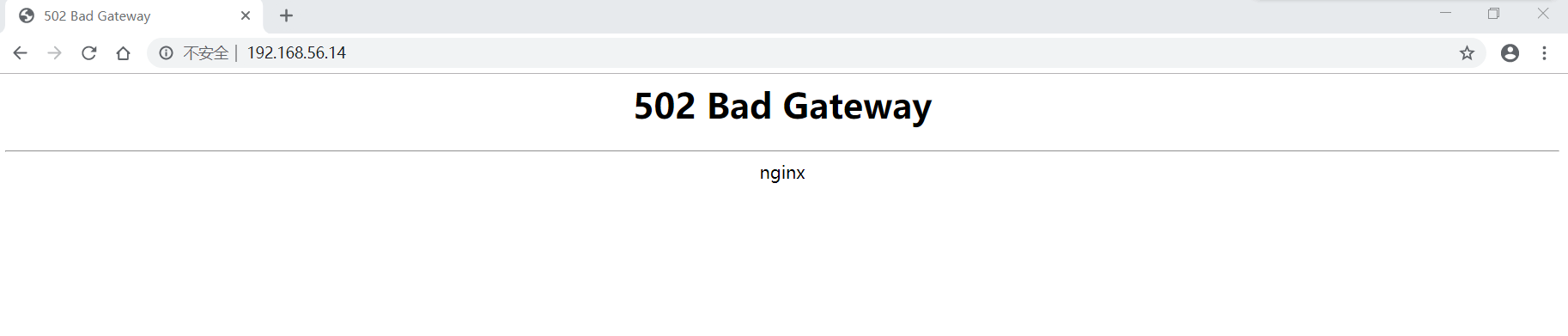
502_bad_gateway.png

查看GitLab的错误日志文件/var/log/nginx/gitlab_error.log:

 1
 2
 3
 4
 5
 6
 7
 8
 9
10
11
[root@server ~]# tail -f /var/log/nginx/gitlab_error.log 
2019/06/22 23:30:13 [crit] 21571#0: *1 connect() to unix:/var/opt/gitlab/gitlab-workhorse/socket failed (13: Permission denied) while connecting to upstream, client: 192.168.56.1, server: 192.168.56.14, request: "GET /favicon.ico HTTP/1.1", upstream: "http://unix:/var/opt/gitlab/gitlab-workhorse/socket:/favicon.ico", host: "192.168.56.14", referrer: "http://192.168.56.14/"
2019/06/22 23:30:15 [crit] 21571#0: *1 connect() to unix:/var/opt/gitlab/gitlab-workhorse/socket failed (13: Permission denied) while connecting to upstream, client: 192.168.56.1, server: 192.168.56.14, request: "GET / HTTP/1.1", upstream: "http://unix:/var/opt/gitlab/gitlab-workhorse/socket:/", host: "192.168.56.14"
2019/06/22 23:30:15 [crit] 21571#0: *1 connect() to unix:/var/opt/gitlab/gitlab-workhorse/socket failed (13: Permission denied) while connecting to upstream, client: 192.168.56.1, server: 192.168.56.14, request: "GET /favicon.ico HTTP/1.1", upstream: "http://unix:/var/opt/gitlab/gitlab-workhorse/socket:/favicon.ico", host: "192.168.56.14", referrer: "http://192.168.56.14/"
2019/06/22 23:30:16 [crit] 21571#0: *1 connect() to unix:/var/opt/gitlab/gitlab-workhorse/socket failed (13: Permission denied) while connecting to upstream, client: 192.168.56.1, server: 192.168.56.14, request: "GET / HTTP/1.1", upstream: "http://unix:/var/opt/gitlab/gitlab-workhorse/socket:/", host: "192.168.56.14"
2019/06/22 23:30:16 [crit] 21571#0: *1 connect() to unix:/var/opt/gitlab/gitlab-workhorse/socket failed (13: Permission denied) while connecting to upstream, client: 192.168.56.1, server: 192.168.56.14, request: "GET /favicon.ico HTTP/1.1", upstream: "http://unix:/var/opt/gitlab/gitlab-workhorse/socket:/favicon.ico", host: "192.168.56.14", referrer: "http://192.168.56.14/"
2019/06/22 23:30:17 [crit] 21571#0: *1 connect() to unix:/var/opt/gitlab/gitlab-workhorse/socket failed (13: Permission denied) while connecting to upstream, client: 192.168.56.1, server: 192.168.56.14, request: "GET / HTTP/1.1", upstream: "http://unix:/var/opt/gitlab/gitlab-workhorse/socket:/", host: "192.168.56.14"
2019/06/22 23:30:17 [crit] 21571#0: *1 connect() to unix:/var/opt/gitlab/gitlab-workhorse/socket failed (13: Permission denied) while connecting to upstream, client: 192.168.56.1, server: 192.168.56.14, request: "GET /favicon.ico HTTP/1.1", upstream: "http://unix:/var/opt/gitlab/gitlab-workhorse/socket:/favicon.ico", host: "192.168.56.14", referrer: "http://192.168.56.14/"
2019/06/22 23:30:24 [crit] 21571#0: *16 connect() to unix:/var/opt/gitlab/gitlab-workhorse/socket failed (13: Permission denied) while connecting to upstream, client: 192.168.56.1, server: 192.168.56.14, request: "GET / HTTP/1.1", upstream: "http://unix:/var/opt/gitlab/gitlab-workhorse/socket:/", host: "192.168.56.14"
2019/06/22 23:30:24 [crit] 21571#0: *16 connect() to unix:/var/opt/gitlab/gitlab-workhorse/socket failed (13: Permission denied) while connecting to upstream, client: 192.168.56.1, server: 192.168.56.14, request: "GET /favicon.ico HTTP/1.1", upstream: "http://unix:/var/opt/gitlab/gitlab-workhorse/socket:/favicon.ico", host: "192.168.56.14"
2019/06/22 23:30:27 [crit] 21571#0: *16 connect() to unix:/var/opt/gitlab/gitlab-workhorse/socket failed (13: Permission denied) while connecting to upstream, client: 192.168.56.1, server: 192.168.56.14, request: "GET / HTTP/1.1", upstream: "http://unix:/var/opt/gitlab/gitlab-workhorse/socket:/", host: "192.168.56.14"

可以发现上游权限配置异常。

GitLab异常调试

GitLab异常调试是一个痛苦的过程,为了让GitLab跑起来,需要不断的尝试。

我们给/var/opt/gitlab/gitlab-workhorse/增加可执行权限:

1
2
3
4
5
[root@server ~]# ls -lad /var/opt/gitlab/gitlab-workhorse/
drwxr-x---.  2 git               nginx   54 Jun 23 08:56 /var/opt/gitlab/gitlab-workhorse/
[root@server ~]# chmod -R o+x /var/opt/gitlab/gitlab-workhorse/
[root@server ~]# ls -lad /var/opt/gitlab/gitlab-workhorse/
drwxr-x--x.  2 git               nginx   54 Jun 23 08:56 /var/opt/gitlab/gitlab-workhorse/

重启GitLab,再次访问 http://192.168.56.14/ ,仍然提示权限异常:

 1
 2
 3
 4
 5
 6
 7
 8
 9
10
11
12
13
14
15
16
17
18
19
20
[root@server ~]# gitlab-ctl restart
ok: run: alertmanager: (pid 24936) 1s
ok: run: gitaly: (pid 24949) 0s
ok: run: gitlab-monitor: (pid 24967) 1s
ok: run: gitlab-workhorse: (pid 24971) 0s
ok: run: logrotate: (pid 24981) 1s
ok: run: node-exporter: (pid 24998) 0s
ok: run: postgres-exporter: (pid 25004) 1s
ok: run: postgresql: (pid 25014) 0s
ok: run: prometheus: (pid 25022) 1s
ok: run: redis: (pid 25029) 0s
ok: run: redis-exporter: (pid 25034) 1s
ok: run: sidekiq: (pid 25041) 1s
ok: run: unicorn: (pid 25129) 0s
[root@server ~]# systemctl restart nginx
[root@server ~]# echo "" > /var/log/nginx/gitlab_error.log 
[root@server ~]# tail -f /var/log/nginx/gitlab_error.log 

2019/06/23 10:33:09 [crit] 25171#0: *1 connect() to unix:/var/opt/gitlab/gitlab-workhorse/socket failed (13: Permission denied) while connecting to upstream, client: 192.168.56.1, server: 192.168.56.14, request: "GET / HTTP/1.1", upstream: "http://unix:/var/opt/gitlab/gitlab-workhorse/socket:/", host: "192.168.56.14"
2019/06/23 10:33:09 [crit] 25171#0: *1 connect() to unix:/var/opt/gitlab/gitlab-workhorse/socket failed (13: Permission denied) while connecting to upstream, client: 192.168.56.1, server: 192.168.56.14, request: "GET /favicon.ico HTTP/1.1", upstream: "http://unix:/var/opt/gitlab/gitlab-workhorse/socket:/favicon.ico", host: "192.168.56.14", referrer: "http://192.168.56.14/"

我们重新配置GitLab:

 1
 2
 3
 4
 5
 6
 7
 8
 9
10
11
12
13
14
15
16
17
18
19
20
21
22
23
24
25
26
27
28
29
30
31
32
33
34
35
36
37
38
39
40
41
42
43
44
45
46
47
48
49
50
51
52
53
[root@server ~]# gitlab-ctl stop
ok: down: alertmanager: 0s, normally up
ok: down: gitaly: 0s, normally up
ok: down: gitlab-monitor: 0s, normally up
ok: down: gitlab-workhorse: 1s, normally up
ok: down: logrotate: 0s, normally up
ok: down: node-exporter: 1s, normally up
ok: down: postgres-exporter: 0s, normally up
ok: down: postgresql: 0s, normally up
ok: down: prometheus: 0s, normally up
ok: down: redis: 0s, normally up
ok: down: redis-exporter: 1s, normally up
ok: down: sidekiq: 0s, normally up
ok: down: unicorn: 0s, normally up
[root@server ~]# gitlab-ctl cleanse
    *******************************************************************
    * * * * * * * * * * *       STOP AND READ       * * * * * * * * * *
    *******************************************************************
    This command will delete *all* local configuration, log, and
    variable data associated with gitlab.

    You have 60 seconds to hit CTRL-C before configuration,
    logs, and local data for this application are permanently
    deleted.
    *******************************************************************
ok: down: alertmanager: 90s, normally up
ok: down: gitaly: 89s, normally up
ok: down: gitlab-monitor: 89s, normally up
ok: down: gitlab-workhorse: 89s, normally up
ok: down: logrotate: 88s, normally up
ok: down: node-exporter: 88s, normally up
ok: down: postgres-exporter: 87s, normally up
ok: down: postgresql: 87s, normally up
ok: down: prometheus: 86s, normally up
ok: down: redis: 86s, normally up
ok: down: redis-exporter: 86s, normally up
ok: down: sidekiq: 84s, normally up
ok: down: unicorn: 83s, normally up
alertmanager disabled, not stopping
gitaly disabled, not stopping
gitlab-monitor disabled, not stopping
gitlab-workhorse disabled, not stopping
logrotate disabled, not stopping
node-exporter disabled, not stopping
postgres-exporter disabled, not stopping
postgresql disabled, not stopping
prometheus disabled, not stopping
redis disabled, not stopping
redis-exporter disabled, not stopping
sidekiq disabled, not stopping
unicorn disabled, not stopping
Terminating processes running under application users. This will take a few seconds.
Your config files have been backed up to /root/gitlab-cleanse-2019-06-23T10:39.

卸载掉GitLab并删除相关文件:

 1
 2
 3
 4
 5
 6
 7
 8
 9
10
11
12
13
14
15
16
17
18
19
20
21
22
23
24
25
26
27
28
29
30
31
32
33
34
35
36
[root@server ~]# yum remove gitlab-ce
Loaded plugins: fastestmirror
Resolving Dependencies
--> Running transaction check
---> Package gitlab-ce.x86_64 0:11.10.0-ce.0.el7 will be erased
--> Finished Dependency Resolution

Dependencies Resolved

=====================================================================================================================================================
 Package                           Arch                           Version                                   Repository                          Size
=====================================================================================================================================================
Removing:
 gitlab-ce                         x86_64                         11.10.0-ce.0.el7                          @gitlab-ce                         1.4 G

Transaction Summary
=====================================================================================================================================================
Remove  1 Package

Installed size: 1.4 G
Is this ok [y/N]: y
Downloading packages:
Running transaction check
Running transaction test
Transaction test succeeded
Running transaction
  Erasing    : gitlab-ce-11.10.0-ce.0.el7.x86_64                                                                                                 1/1 
  Verifying  : gitlab-ce-11.10.0-ce.0.el7.x86_64                                                                                                 1/1 

Removed:
  gitlab-ce.x86_64 0:11.10.0-ce.0.el7                                                                                                                

Complete!
[root@server ~]# trash-put /opt/gitlab
[root@server ~]# trash-put /var/log/nginx/gitlab_*
[root@server ~]# trash-empty

再检查一下相关目录:

1
2
3
4
5
6
[root@server ~]# ls -lah /etc/gitlab/
ls: cannot access /etc/gitlab/: No such file or directory
[root@server ~]# ls -lah /var/opt/gitlab/
ls: cannot access /var/opt/gitlab/: No such file or directory
[root@server ~]# ls -lah /opt/gitlab
ls: cannot access /opt/gitlab: No such file or directory

说明GitLab相关文件已经删除。

我们重新安装:

 1
 2
 3
 4
 5
 6
 7
 8
 9
10
11
12
13
14
15
16
17
18
19
20
21
22
23
24
25
26
27
28
29
30
31
32
33
34
35
36
37
38
39
40
41
42
43
44
45
46
47
48
49
50
51
52
53
54
55
56
57
58
59
60
61
62
[root@server ~]# rpm -ivh gitlab-ce-11.10.0-ce.0.el7.x86_64.rpm 
warning: gitlab-ce-11.10.0-ce.0.el7.x86_64.rpm: Header V4 RSA/SHA1 Signature, key ID f27eab47: NOKEY
Preparing...                          ################################# [100%]
Updating / installing...
   1:gitlab-ce-11.10.0-ce.0.el7       ################################# [100%]
It looks like GitLab has not been configured yet; skipping the upgrade script.

       *.                  *.
      ***                 ***
     *****               *****
    .******             *******
    ********            ********
   ,,,,,,,,,***********,,,,,,,,,
  ,,,,,,,,,,,*********,,,,,,,,,,,
  .,,,,,,,,,,,*******,,,,,,,,,,,,
      ,,,,,,,,,*****,,,,,,,,,.
         ,,,,,,,****,,,,,,
            .,,,***,,,,
                ,*,.


     _______ __  __          __
    / ____(_) /_/ /   ____ _/ /_
   / / __/ / __/ /   / __ `/ __ \
  / /_/ / / /_/ /___/ /_/ / /_/ /
  \____/_/\__/_____/\__,_/_.___/
  

Thank you for installing GitLab!
GitLab was unable to detect a valid hostname for your instance.
Please configure a URL for your GitLab instance by setting `external_url`
configuration in /etc/gitlab/gitlab.rb file.
Then, you can start your GitLab instance by running the following command:
  sudo gitlab-ctl reconfigure

For a comprehensive list of configuration options please see the Omnibus GitLab readme
https://gitlab.com/gitlab-org/omnibus-gitlab/blob/master/README.md

[root@server ~]# ls -lah /etc/gitlab/
total 100K
drwxr-xr-x.  2 root root   23 Jun 23 10:53 .
drwxr-xr-x. 90 root root 8.0K Jun 23 10:53 ..
-rw-------.  1 root root  88K Jun 23 10:53 gitlab.rb
[root@server ~]# ls -lah /var/opt/gitlab
ls: cannot access /var/opt/gitlab: No such file or directory
[root@server ~]# ls -lah /opt/gitlab/
total 2.9M
drwxr-xr-x.  9 root root  201 Jun 23 10:53 .
drwxr-xr-x.  7 root root   84 Jun 23 10:52 ..
drwxr-xr-x.  2 root root  108 Jun 23 10:52 bin
-rw-r--r--.  1 root root 162K Apr 19 19:59 dependency_licenses.json
drwxr-xr-x. 16 root root  191 Jun 23 10:53 embedded
drwxr-xr-x.  2 root root   32 Jun 23 10:53 etc
drwxr-xr-x.  2 root root    6 Apr 19 19:59 init
-rw-r--r--.  1 root root 2.7M Apr 19 19:59 LICENSE
drwxr-xr-x.  2 root root  24K Jun 23 10:52 LICENSES
drwxr-xr-x.  2 root root    6 Apr 19 19:59 service
drwxr-xr-x.  2 root root    6 Apr 19 19:59 sv
-rw-r--r--.  1 root root  26K Apr 19 19:59 version-manifest.json
-rw-r--r--.  1 root root  12K Apr 19 19:59 version-manifest.txt
[root@server ~]# 

重新对/etc/gitlab/gitlab.rb进行配置,我将设置过程编写了脚本gitlab_conf_init.sh,直接执行即可修改配置文件/etc/gitlab/gitlab.rb:

 1
 2
 3
 4
 5
 6
 7
 8
 9
10
11
12
13
14
[root@server ~]# sh gitlab_conf_init.sh
目录/home/git/git-data存在
Step 1: set external url
Step 2: set Time Zone
Step 3: Email Setting
Step 4: Disallow users creating top-level groups
Step 5: Disallow users changing usernames
Step 6: Configuring GitLab trusted_proxies
Step 7: Git data dirs Settings
Step 8: SMTP settings
Step 9: GitLab User Settings
Step 10: Set the username of the non-bundled web-server user
Step 11: Disable bundled Nginx
OK. Done!!!

加载配置:

 1
 2
 3
 4
 5
 6
 7
 8
 9
10
11
12
13
14
15
16
17
18
19
20
21
22
23
24
25
26
27
28
29
30
31
32
33
34
35
36
37
38
39
40
41
42
43
44
45
46
47
48
49
50
51
52
53
54
55
56
57
58
59
60
61
[root@server ~]# systemctl start gitlab-runsvdir
[root@server ~]# gitlab-ctl reconfigure
Starting Chef Client, version 13.6.4
resolving cookbooks for run list: ["gitlab"]
Synchronizing Cookbooks:
...... 执行剧本,省略
...... 执行剧本,省略
Recipe: gitlabgitlab-rails
  * execute[clear the gitlab-rails cache] action run
    - execute /opt/gitlab/bin/gitlab-rake cache:clear
Recipe: <Dynamically Defined Resource>
  * service[gitaly] action restart
    - restart service service[gitaly]
Recipe: gitalyenable
  * runit_service[gitaly] action hup
    - send hup to runit_service[gitaly]
Recipe: <Dynamically Defined Resource>
  * service[gitlab-workhorse] action restart
    - restart service service[gitlab-workhorse]
  * service[node-exporter] action restart
    - restart service service[node-exporter]
  * service[gitlab-monitor] action restart
    - restart service service[gitlab-monitor]
  * service[redis-exporter] action restart
    - restart service service[redis-exporter]
  * service[prometheus] action restart
    - restart service service[prometheus]
Recipe: gitlabprometheus
  * execute[reload prometheus] action run
    - execute /opt/gitlab/bin/gitlab-ctl hup prometheus
Recipe: <Dynamically Defined Resource>
  * service[alertmanager] action restart
    - restart service service[alertmanager]
  * service[postgres-exporter] action restart
    - restart service service[postgres-exporter]

Running handlers:
Running handlers complete
Chef Client finished, 424/1194 resources updated in 03 minutes 06 seconds
gitlab Reconfigured!

[root@server ~]# ls -lah /var/opt/gitlab/
total 12K
drwxr-xr-x. 16 root              root  4.0K Jun 23 11:06 .
drwxr-xr-x.  5 root              root    48 Jun 23 11:03 ..
drwxr-x---.  3 gitlab-prometheus root    42 Jun 23 11:06 alertmanager
drwx------.  2 git               root     6 Jun 23 11:04 backups
-rw-------.  1 root              root    38 Jun 23 11:05 bootstrapped
drwx------.  2 git               root    79 Jun 23 11:06 gitaly
drwxr-xr-x.  3 git               root    20 Jun 23 11:04 gitlab-ci
drwxr-xr-x.  2 git               root    32 Jun 23 11:05 gitlab-monitor
drwxr-xr-x.  9 git               root   160 Jun 23 11:05 gitlab-rails
drwx------.  2 git               root    24 Jun 23 11:03 gitlab-shell
drwxr-x---.  2 git               nginx   54 Jun 23 11:06 gitlab-workhorse
drwx------.  3 root              root    47 Jun 23 11:05 logrotate
drwxr-xr-x.  3 root              root    32 Jun 23 11:05 node-exporter
drwx------.  2 gitlab-psql       root    26 Jun 23 11:06 postgres-exporter
drwxr-xr-x.  3 gitlab-psql       root    81 Jun 23 11:04 postgresql
drwxr-x---.  4 gitlab-prometheus root    53 Jun 23 11:05 prometheus
-rw-r--r--.  1 root              root   226 Jun 23 11:06 public_attributes.json
drwxr-x---.  2 gitlab-redis      git     44 Jun 23 11:04 redis

启动GitLab和Nginx服务:

 1
 2
 3
 4
 5
 6
 7
 8
 9
10
11
12
13
14
15
16
17
18
19
20
21
22
23
24
25
26
27
28
29
30
31
32
33
34
35
[root@server ~]# gitlab-ctl start
ok: run: alertmanager: (pid 29988) 354s
ok: run: gitaly: (pid 29868) 359s
ok: run: gitlab-monitor: (pid 29929) 357s
ok: run: gitlab-workhorse: (pid 29898) 358s
ok: run: logrotate: (pid 29237) 429s
ok: run: node-exporter: (pid 29912) 358s
ok: run: postgres-exporter: (pid 30004) 354s
ok: run: postgresql: (pid 28639) 489s
ok: run: prometheus: (pid 29953) 356s
ok: run: redis: (pid 28313) 506s
ok: run: redis-exporter: (pid 29942) 357s
ok: run: sidekiq: (pid 29088) 441s
ok: run: unicorn: (pid 29002) 447s
[root@server ~]# systemctl start nginx
[root@server ~]# ls -lah /var/opt/gitlab/
total 12K
drwxr-xr-x. 16 root              root  4.0K Jun 23 11:06 .
drwxr-xr-x.  5 root              root    48 Jun 23 11:03 ..
drwxr-x---.  3 gitlab-prometheus root    42 Jun 23 11:12 alertmanager
drwx------.  2 git               root     6 Jun 23 11:04 backups
-rw-------.  1 root              root    38 Jun 23 11:05 bootstrapped
drwx------.  2 git               root    79 Jun 23 11:12 gitaly
drwxr-xr-x.  3 git               root    20 Jun 23 11:04 gitlab-ci
drwxr-xr-x.  2 git               root    32 Jun 23 11:12 gitlab-monitor
drwxr-xr-x.  9 git               root   160 Jun 23 11:11 gitlab-rails
drwx------.  2 git               root    24 Jun 23 11:11 gitlab-shell
drwxr-x---.  2 git               nginx   54 Jun 23 11:12 gitlab-workhorse
drwx------.  3 root              root    47 Jun 23 11:12 logrotate
drwxr-xr-x.  3 root              root    32 Jun 23 11:05 node-exporter
drwx------.  2 gitlab-psql       root    26 Jun 23 11:12 postgres-exporter
drwxr-xr-x.  3 gitlab-psql       root    81 Jun 23 11:12 postgresql
drwxr-x---.  4 gitlab-prometheus root    53 Jun 23 11:12 prometheus
-rw-r--r--.  1 root              root   226 Jun 23 11:12 public_attributes.json
drwxr-x---.  2 gitlab-redis      git     60 Jun 23 11:12 redis

访问GitLab,仍然显示"502 Bad Gateway"!我们把nginx加入到git组中:

参考: 【Nginx】 *26054 open() “/var/lib/nginx/tmp/client_body/0000000005” failed (13: Permission denied)

1
2
3
4
5
6
[root@server ~]# gpasswd -a nginx git
Adding user nginx to group git
[root@server ~]# id nginx
uid=992(nginx) gid=989(nginx) groups=989(nginx),1001(git)
[root@server ~]# id git
uid=1001(git) gid=1001(git) groups=1001(git)

再重启GitLab和Nginx服务,并访问GitLab,仍然显示"502 Bad Gateway"

 1
 2
 3
 4
 5
 6
 7
 8
 9
10
11
12
13
14
15
16
17
18
19
20
[root@server ~]# gitlab-ctl restart
ok: run: alertmanager: (pid 2951) 1s
ok: run: gitaly: (pid 2964) 0s
ok: run: gitlab-monitor: (pid 2982) 1s
ok: run: gitlab-workhorse: (pid 2987) 0s
ok: run: logrotate: (pid 2997) 0s
ok: run: node-exporter: (pid 3016) 1s
ok: run: postgres-exporter: (pid 3023) 0s
ok: run: postgresql: (pid 3033) 1s
ok: run: prometheus: (pid 3036) 0s
ok: run: redis: (pid 3051) 1s
ok: run: redis-exporter: (pid 3055) 0s
ok: run: sidekiq: (pid 3063) 0s
ok: run: unicorn: (pid 3152) 0s
[root@server ~]# systemctl restart nginx
[root@server ~]# echo "" > /var/log/nginx/gitlab_error.log 
[root@server ~]# tail -f /var/log/nginx/gitlab_error.log 

2019/06/23 11:37:19 [crit] 3199#0: *1 connect() to unix:/var/opt/gitlab/gitlab-workhorse/socket failed (13: Permission denied) while connecting to upstream, client: 192.168.56.1, server: 192.168.56.14, request: "GET / HTTP/1.1", upstream: "http://unix:/var/opt/gitlab/gitlab-workhorse/socket:/", host: "192.168.56.14"
2019/06/23 11:37:19 [crit] 3199#0: *1 connect() to unix:/var/opt/gitlab/gitlab-workhorse/socket failed (13: Permission denied) while connecting to upstream, client: 192.168.56.1, server: 192.168.56.14, request: "GET /favicon.ico HTTP/1.1", upstream: "http://unix:/var/opt/gitlab/gitlab-workhorse/socket:/favicon.ico", host: "192.168.56.14", referrer: "http://192.168.56.14/"

::: warning 警告 https://docs.gitlab.com/omnibus/settings/nginx.html#using-a-non-bundled-web-server中指出:

Note: if you are using SELinux and your web server runs under a restricted SELinux profile you may have to loosen the restrictions on your web server Note: make sure that the webserver user has the correct permissions on all directories used by external web-server, otherwise you will receive failed (XX: Permission denied) while reading upstream errors. :::

检查SELinux配置
 1
 2
 3
 4
 5
 6
 7
 8
 9
10
11
12
13
14
15
16
17
18
19
20
21
22
23
24
25
26
27
[root@server ~]# getenforce 
Enforcing

[root@server ~]# sestatus 
SELinux status:                 enabled
SELinuxfs mount:                /sys/fs/selinux
SELinux root directory:         /etc/selinux
Loaded policy name:             targeted
Current mode:                   enforcing
Mode from config file:          enforcing
Policy MLS status:              enabled
Policy deny_unknown status:     allowed
Max kernel policy version:      31

[root@server ~]# cat /etc/selinux/config 

## This file controls the state of SELinux on the system.
## SELINUX= can take one of these three values:
##     enforcing - SELinux security policy is enforced.
##     permissive - SELinux prints warnings instead of enforcing.
##     disabled - No SELinux policy is loaded.
SELINUX=enforcing
## SELINUXTYPE= can take one of three values:
##     targeted - Targeted processes are protected,
##     minimum - Modification of targeted policy. Only selected processes are protected. 
##     mls - Multi Level Security protection.
SELINUXTYPE=targeted 

可以发现SELinux已经开启。

  • SELinux主要作用就是最大限度地减小系统中服务进程可访问的资源(最小权限原则)。
  • targeted:对大部分网络服务进程进行管制。这是系统默认使用的政策。
  • SELinux工作模式: enforcing:强制模式。违反SELinux规则的行为将被阻止并记录到日志中。
  • SELinux工作模式: permissive:宽容模式。违反SELinux 规则的行为只会记录到日志中。一般为调试用。
  • SELinux工作模式: disabled:关闭模式。不启用SElinux。
  • sestatus 命令,查看SELinux的具体的工作状态。
  • getenforce 命令,查看SELinux当前的工作模式。
  • getsebool -a 命令,查看SELinux下不同的规则,SELinux根据不同的工作类型对这些规则打开或关闭(on|off<布尔值1|0>),然后通过规则的开启与关闭具体地限制不同进程对文件的读取。

查看SELinux下不同的规则:

 1
 2
 3
 4
 5
 6
 7
 8
 9
10
11
12
13
14
15
16
17
18
19
20
21
22
23
24
25
26
27
28
29
30
31
32
33
34
35
36
37
38
39
40
41
42
43
44
45
46
[root@server ~]# getsebool -a|wc -l
331
[root@server ~]# getsebool -a|grep httpd
httpd_anon_write --> off
httpd_builtin_scripting --> on
httpd_can_check_spam --> off
httpd_can_connect_ftp --> off
httpd_can_connect_ldap --> off
httpd_can_connect_mythtv --> off
httpd_can_connect_zabbix --> off
httpd_can_network_connect --> off
httpd_can_network_connect_cobbler --> off
httpd_can_network_connect_db --> off
httpd_can_network_memcache --> off
httpd_can_network_relay --> off
httpd_can_sendmail --> off
httpd_dbus_avahi --> off
httpd_dbus_sssd --> off
httpd_dontaudit_search_dirs --> off
httpd_enable_cgi --> on
httpd_enable_ftp_server --> off
httpd_enable_homedirs --> off
httpd_execmem --> off
httpd_graceful_shutdown --> on
httpd_manage_ipa --> off
httpd_mod_auth_ntlm_winbind --> off
httpd_mod_auth_pam --> off
httpd_read_user_content --> off
httpd_run_foreman --> on
httpd_run_ipa --> off
httpd_run_preupgrade --> off
httpd_run_stickshift --> off
httpd_serve_cobbler_files --> off
httpd_setrlimit --> on
httpd_ssi_exec --> off
httpd_sys_script_anon_write --> off
httpd_tmp_exec --> off
httpd_tty_comm --> off
httpd_unified --> off
httpd_use_cifs --> off
httpd_use_fusefs --> off
httpd_use_gpg --> off
httpd_use_nfs --> off
httpd_use_openstack --> off
httpd_use_sasl --> off
httpd_verify_dns --> off

开启下面三个设置, setsebool -P表示重启后保留设置,永久设置:

 1
 2
 3
 4
 5
 6
 7
 8
 9
10
11
12
13
14
15
16
17
18
19
20
21
22
23
24
25
[root@server ~]# setsebool -P httpd_can_network_connect on
[root@server ~]# setsebool -P httpd_can_network_relay on
[root@server ~]# setsebool -P httpd_read_user_content on

[root@server ~]# getsebool -a|grep 'httpd_can'           
httpd_can_check_spam --> off
httpd_can_connect_ftp --> off
httpd_can_connect_ldap --> off
httpd_can_connect_mythtv --> off
httpd_can_connect_zabbix --> off
httpd_can_network_connect --> on
httpd_can_network_connect_cobbler --> off
httpd_can_network_connect_db --> off
httpd_can_network_memcache --> off
httpd_can_network_relay --> on
httpd_can_sendmail --> off
[root@server ~]# getsebool -a|grep 'httpd_read'
httpd_read_user_content --> on

semanage -i - <<EOF
fcontext -a -t user_home_dir_t '/home/git(/.*)?'
fcontext -a -t ssh_home_t '/home/git/.ssh(/.*)?'
fcontext -a -t httpd_sys_content_t '/var/opt/gitlab/public(/.*)?'
fcontext -a -t httpd_sys_content_t '/home/git/repositories(/.*)?'
EOF

重启服务器:

1
[root@server ~]# shutdown -r now

访问GitLab,仍然显示"502 Bad Gateway"!!!

尝试临时关闭SELinux:

1
[root@server ~]# setenforce 0

访问GitLab,可以访问!!!

1
2
3
尝试临时开启SELinux

[root@server ~]# setenforce 1

访问GitLab,又显示"502 Bad Gateway"!!!我决定彻底关闭SELinux。

修改SELinux配置,关闭SELinux:

 1
 2
 3
 4
 5
 6
 7
 8
 9
10
11
12
13
14
15
16
[root@server ~]# sed -i '7s@^SELINUX=enforcing@SELINUX=disabled@g' /etc/selinux/config
[root@server ~]# cat -n /etc/selinux/config 
     1
     2  # This file controls the state of SELinux on the system.
     3  # SELINUX= can take one of these three values:
     4  #     enforcing - SELinux security policy is enforced.
     5  #     permissive - SELinux prints warnings instead of enforcing.
     6  #     disabled - No SELinux policy is loaded.
     7  SELINUX=disabled
     8  # SELINUXTYPE= can take one of three values:
     9  #     targeted - Targeted processes are protected,
    10  #     minimum - Modification of targeted policy. Only selected processes are protected. 
    11  #     mls - Multi Level Security protection.
    12  SELINUXTYPE=targeted 
    13
    14

为了还原GitLab相关文件原有权限,我们卸载GitLab并删除相关目录,进行清理工作:

 1
 2
 3
 4
 5
 6
 7
 8
 9
10
11
12
13
14
15
16
17
18
19
20
21
22
23
24
25
26
27
28
29
30
31
32
33
34
35
36
37
38
39
40
41
42
43
44
45
46
47
48
49
50
51
52
53
54
55
56
57
58
59
60
[root@server ~]# gitlab-ctl stop
ok: down: alertmanager: 0s, normally up
ok: down: gitaly: 0s, normally up
ok: down: gitlab-monitor: 1s, normally up
ok: down: gitlab-workhorse: 0s, normally up
ok: down: logrotate: 1s, normally up
ok: down: node-exporter: 0s, normally up
ok: down: postgres-exporter: 0s, normally up
ok: down: postgresql: 1s, normally up
ok: down: prometheus: 0s, normally up
ok: down: redis: 1s, normally up
ok: down: redis-exporter: 0s, normally up
ok: down: sidekiq: 0s, normally up
ok: down: unicorn: 0s, normally up
[root@server ~]# systemctl stop gitlab-runsvdir
[root@server ~]# systemctl stop nginx
[root@server ~]# ps -ef|grep nginx
root     19967 13485  0 14:09 pts/0    00:00:00 grep --color=auto nginx
[root@server ~]# ps -ef|grep gitlab
root     19972 13485  0 14:09 pts/0    00:00:00 grep --color=auto gitlab
[root@server ~]# yum remove gitlab-ce
Loaded plugins: fastestmirror
Resolving Dependencies
--> Running transaction check
---> Package gitlab-ce.x86_64 0:11.10.0-ce.0.el7 will be erased
--> Finished Dependency Resolution

Dependencies Resolved

=====================================================================================================================================================
 Package                           Arch                           Version                                    Repository                         Size
=====================================================================================================================================================
Removing:
 gitlab-ce                         x86_64                         11.10.0-ce.0.el7                           installed                         1.4 G

Transaction Summary
=====================================================================================================================================================
Remove  1 Package

Installed size: 1.4 G
Is this ok [y/N]: y
Downloading packages:
Running transaction check
Running transaction test
Transaction test succeeded
Running transaction
Warning: RPMDB altered outside of yum.
** Found 1 pre-existing rpmdb problem(s), 'yum check' output follows:
ius-release-2-1.el7.ius.noarch is a duplicate with ius-release-1.0-15.ius.centos7.noarch
  Erasing    : gitlab-ce-11.10.0-ce.0.el7.x86_64                                                                                                 1/1 
  Verifying  : gitlab-ce-11.10.0-ce.0.el7.x86_64                                                                                                 1/1 

Removed:
  gitlab-ce.x86_64 0:11.10.0-ce.0.el7                                                                                                                

Complete!

[root@server ~]# trash-put /var/opt/gitlab /opt/gitlab /var/log/gitlab/ /var/log/nginx/gitlab_* /etc/gitlab

[root@server ~]# find / -name 'gitlab*'

清理工作完成后,重启服务器:

1
[root@server ~]# shutdown -r now

关闭SELinux后,重新配置GitLab服务

  • 查看SELinux的具体的工作状态
1
2
3
4
5
6
[root@server ~]# getenforce 
Disabled
[root@server ~]# getsebool 
getsebool:  SELinux is disabled
[root@server ~]# getsebool -a
getsebool:  SELinux is disabled

说明SELinux已经关闭!

  • 重新安装Nginx服务
 1
 2
 3
 4
 5
 6
 7
 8
 9
10
11
12
13
14
[root@server ~]# yum remove nginx -y
[root@server ~]# userdel nginx

[root@server ~]# yum install nginx -y
[root@server ~]# useradd nginx

[root@server ~]# nginx -V
nginx version: nginx/1.12.2
built by gcc 4.8.5 20150623 (Red Hat 4.8.5-36) (GCC) 
built with OpenSSL 1.0.2k-fips  26 Jan 2017
TLS SNI support enabled
configure arguments: --prefix=/usr/share/nginx --sbin-path=/usr/sbin/nginx --modules-path=/usr/lib64/nginx/modules --conf-path=/etc/nginx/nginx.conf --error-log-path=/var/log/nginx/error.log --http-log-path=/var/log/nginx/access.log --http-client-body-temp-path=/var/lib/nginx/tmp/client_body --http-proxy-temp-path=/var/lib/nginx/tmp/proxy --http-fastcgi-temp-path=/var/lib/nginx/tmp/fastcgi --http-uwsgi-temp-path=/var/lib/nginx/tmp/uwsgi --http-scgi-temp-path=/var/lib/nginx/tmp/scgi --pid-path=/run/nginx.pid --lock-path=/run/lock/subsys/nginx --user=nginx --group=nginx --with-file-aio --with-ipv6 --with-http_auth_request_module --with-http_ssl_module --with-http_v2_module --with-http_realip_module --with-http_addition_module --with-http_xslt_module=dynamic --with-http_image_filter_module=dynamic --with-http_geoip_module=dynamic --with-http_sub_module --with-http_dav_module --with-http_flv_module --with-http_mp4_module --with-http_gunzip_module --with-http_gzip_static_module --with-http_random_index_module --with-http_secure_link_module --with-http_degradation_module --with-http_slice_module --with-http_stub_status_module --with-http_perl_module=dynamic --with-mail=dynamic --with-mail_ssl_module --with-pcre --with-pcre-jit --with-stream=dynamic --with-stream_ssl_module --with-google_perftools_module --with-debug --with-cc-opt='-O2 -g -pipe -Wall -Wp,-D_FORTIFY_SOURCE=2 -fexceptions -fstack-protector-strong --param=ssp-buffer-size=4 -grecord-gcc-switches -specs=/usr/lib/rpm/redhat/redhat-hardened-cc1 -m64 -mtune=generic' --with-ld-opt='-Wl,-z,relro -specs=/usr/lib/rpm/redhat/redhat-hardened-ld -Wl,-E'
[root@server ~]# nginx -v
nginx version: nginx/1.12.2

为了让Nginx能够访问git中的数据,将Nginx账号加入到git组中,参考 Give nginx access to git group

 1
 2
 3
 4
 5
 6
 7
 8
 9
10
[root@server ~]# id git
uid=1001(git) gid=1001(git) groups=1001(git)
[root@server ~]# id nginx
uid=1002(nginx) gid=1002(nginx) groups=1002(nginx)
[root@server ~]# gpasswd -a nginx git
Adding user nginx to group git
[root@server ~]# id git
uid=1001(git) gid=1001(git) groups=1001(git)
[root@server ~]# id nginx
uid=1002(nginx) gid=1002(nginx) groups=1002(nginx),1001(git)
  • 重新安装GitLab
1
[root@server ~]# rpm -ivh gitlab-ce-11.10.0-ce.0.el7.x86_64.rpm 
  • 修改配置文件
  1
  2
  3
  4
  5
  6
  7
  8
  9
 10
 11
 12
 13
 14
 15
 16
 17
 18
 19
 20
 21
 22
 23
 24
 25
 26
 27
 28
 29
 30
 31
 32
 33
 34
 35
 36
 37
 38
 39
 40
 41
 42
 43
 44
 45
 46
 47
 48
 49
 50
 51
 52
 53
 54
 55
 56
 57
 58
 59
 60
 61
 62
 63
 64
 65
 66
 67
 68
 69
 70
 71
 72
 73
 74
 75
 76
 77
 78
 79
 80
 81
 82
 83
 84
 85
 86
 87
 88
 89
 90
 91
 92
 93
 94
 95
 96
 97
 98
 99
100
101
102
103
104
105
106
[root@server ~]# sh gitlab_conf_init.sh 
目录/home/git/git-data存在
Step 1: set external url
Step 2: set Time Zone
Step 3: Email Setting
Step 4: Disallow users creating top-level groups
Step 5: Disallow users changing usernames
Step 6: Configuring GitLab trusted_proxies
Step 7: Git data dirs Settings
Step 8: SMTP settings
Step 9: GitLab User Settings
Step 10: Set the username of the non-bundled web-server user
Step 11: Disable bundled Nginx
OK. Done!!!

[root@server ~]# ls /etc/gitlab/
gitlab.rb  gitlab.rb.20190623-145044.bak
[root@server ~]# diff /etc/gitlab/gitlab.rb.20190623-145044.bak /etc/gitlab/gitlab.rb
13c13
< external_url 'http://gitlab.example.com'
---
> external_url "http://192.168.56.14"
49c49
< # gitlab_rails['time_zone'] = 'UTC'
---
> gitlab_rails['time_zone'] = 'Asia/Shanghai'
52,56c52,56
< # gitlab_rails['gitlab_email_enabled'] = true
< # gitlab_rails['gitlab_email_from'] = 'example@example.com'
< # gitlab_rails['gitlab_email_display_name'] = 'Example'
< # gitlab_rails['gitlab_email_reply_to'] = 'noreply@example.com'
< # gitlab_rails['gitlab_email_subject_suffix'] = ''
---
> gitlab_rails['gitlab_email_enabled'] = true
> gitlab_rails['gitlab_email_from'] = 'mzh_love_linux@163.com'
> gitlab_rails['gitlab_email_display_name'] = 'GitLab'
> gitlab_rails['gitlab_email_reply_to'] = 'mzh_love_linux@163.com'
> gitlab_rails['gitlab_email_subject_suffix'] = '[GitLab]'
59,60c59,60
< # gitlab_rails['gitlab_default_can_create_group'] = true
< # gitlab_rails['gitlab_username_changing_enabled'] = true
---
> gitlab_rails['gitlab_default_can_create_group'] = false
> gitlab_rails['gitlab_username_changing_enabled'] = false
113c113
< # gitlab_rails['trusted_proxies'] = []
---
> gitlab_rails['trusted_proxies'] = ['192.168.56.0/24']
380,384c380,384
< # git_data_dirs({
< #   "default" => {
< #     "path" => "/mnt/nfs-01/git-data"
< #    }
< # })
---
> git_data_dirs({
>     "default" => {
>         "path" => "/home/git/git-data"
>     }
> })
511,519c511,519
< # gitlab_rails['smtp_enable'] = true
< # gitlab_rails['smtp_address'] = "smtp.server"
< # gitlab_rails['smtp_port'] = 465
< # gitlab_rails['smtp_user_name'] = "smtp user"
< # gitlab_rails['smtp_password'] = "smtp password"
< # gitlab_rails['smtp_domain'] = "example.com"
< # gitlab_rails['smtp_authentication'] = "login"
< # gitlab_rails['smtp_enable_starttls_auto'] = true
< # gitlab_rails['smtp_tls'] = false
---
> gitlab_rails['smtp_enable'] = true
> gitlab_rails['smtp_address'] = "smtp.163.com"
> gitlab_rails['smtp_port'] = 465
> gitlab_rails['smtp_user_name'] = "mzh_love_linux@163.com"
> gitlab_rails['smtp_password'] = "authCode"
> gitlab_rails['smtp_domain'] = "163.com"
> gitlab_rails['smtp_authentication'] = "login"
> gitlab_rails['smtp_enable_starttls_auto'] = true
> gitlab_rails['smtp_tls'] = true
653,654c653,654
< # user['username'] = "git"
< # user['group'] = "git"
---
> user['username'] = "git"
> user['group'] = "git"
662c662
< # user['home'] = "/var/opt/gitlab"
---
> user['home'] = "/home/git"
665c665
< # user['git_user_email'] = "gitlab@#{node['fqdn']}"
---
> user['git_user_email'] = "mzh_love_linux@163.com"
970,972c970,972
< # web_server['external_users'] = []
< # web_server['username'] = 'gitlab-www'
< # web_server['group'] = 'gitlab-www'
---
> web_server['external_users'] = ['nginx', 'root']
> web_server['username'] = 'nginx'
> web_server['group'] = 'nginx'
983c983
< # nginx['enable'] = true
---
> nginx['enable'] = false
  • 先停止nginx服务,再让配置生效
 1
 2
 3
 4
 5
 6
 7
 8
 9
10
11
12
13
14
15
16
17
18
19
20
21
22
23
24
25
26
27
28
29
30
31
32
33
34
35
36
37
38
39
40
41
42
43
44
45
[root@server ~]# ps -ef|grep nginx
root     13989     1  0 14:40 ?        00:00:00 nginx: master process /usr/sbin/nginx
nginx    13990 13989  0 14:40 ?        00:00:00 nginx: worker process
root     15068 13209  0 14:54 pts/0    00:00:00 grep --color=auto nginx
[root@server ~]# systemctl stop nginx
[root@server ~]# ps -ef|grep nginx   
root     15086 13209  0 14:54 pts/0    00:00:00 grep --color=auto nginx

[root@server ~]# systemctl start gitlab-runsvdir
[root@server ~]# gitlab-ctl reconfigure
Starting Chef Client, version 13.6.4
...... 执行剧本,省略
...... 执行剧本,省略
Running handlers:
Running handlers complete
Chef Client finished, 431/1194 resources updated in 02 minutes 44 seconds
gitlab Reconfigured!

[root@server ~]# ls -lah /var/opt/gitlab/
total 8.0K
drwxr-xr-x  16 root              root  320 Jun 23 14:58 .
drwxr-xr-x.  5 root              root   48 Jun 23 14:54 ..
drwxr-x---   3 gitlab-prometheus root   42 Jun 23 14:58 alertmanager
drwx------   2 git               root    6 Jun 23 14:56 backups
-rw-------   1 root              root   38 Jun 23 14:57 bootstrapped
drwx------   2 git               root   79 Jun 23 14:58 gitaly
drwxr-xr-x   3 git               root   20 Jun 23 14:56 gitlab-ci
drwxr-xr-x   2 git               root   32 Jun 23 14:57 gitlab-monitor
drwxr-xr-x   9 git               root  160 Jun 23 14:57 gitlab-rails
drwx------   2 git               root   24 Jun 23 14:56 gitlab-shell
drwxr-x---   2 git               nginx  54 Jun 23 14:58 gitlab-workhorse
drwx------   3 root              root   47 Jun 23 14:57 logrotate
drwxr-xr-x   3 root              root   32 Jun 23 14:57 node-exporter
drwx------   2 gitlab-psql       root   26 Jun 23 14:58 postgres-exporter
drwxr-xr-x   3 gitlab-psql       root   81 Jun 23 14:56 postgresql
drwxr-x---   4 gitlab-prometheus root   53 Jun 23 14:58 prometheus
-rw-r--r--   1 root              root  226 Jun 23 14:58 public_attributes.json
drwxr-x---   2 gitlab-redis      git    44 Jun 23 14:56 redis
[root@server ~]# ls -lah /home/nginx
total 12K
drwx------  2 nginx nginx  62 Jun 23 14:39 .
drwxr-xr-x. 5 root  root   45 Jun 23 14:39 ..
-rw-r--r--  1 nginx nginx  18 Oct 31  2018 .bash_logout
-rw-r--r--  1 nginx nginx 193 Oct 31  2018 .bash_profile
-rw-r--r--  1 nginx nginx 231 Oct 31  2018 .bashrc
  • 配置GitLab的Nginx配置文件
 1
 2
 3
 4
 5
 6
 7
 8
 9
10
11
12
13
14
15
16
17
18
19
20
21
22
23
24
25
26
27
28
29
[root@server ~]# sed -i "31s@server_name YOUR_SERVER_FQDN;@server_name 192.168.56.14;@g" /etc/nginx/conf.d/gitlab-omnibus-nginx.conf
[root@server ~]# cat -n /etc/nginx/conf.d/gitlab-omnibus-nginx.conf|sed -n '31p'
    31    server_name 192.168.56.14; ## Replace this with something like gitlab.example.com
[root@server ~]# sed -i "38,57s@^@# @g" /etc/nginx/nginx.conf
[root@server ~]# cat -n /etc/nginx/nginx.conf|sed -n '38,57p'
    38  #     server {
    39  #         listen       80 default_server;
    40  #         listen       []:80 default_server;
    41  #         server_name  _;
    42  #         root         /usr/share/nginx/html;
    43  # 
    44  #         # Load configuration files for the default server block.
    45  #         include /etc/nginx/default.d/*.conf;
    46  # 
    47  #         location / {
    48  #         }
    49  # 
    50  #         error_page 404 /404.html;
    51  #             location = /40x.html {
    52  #         }
    53  # 
    54  #         error_page 500 502 503 504 /50x.html;
    55  #             location = /50x.html {
    56  #         }
    57  #     }

[root@server ~]# nginx -t
nginx: the configuration file /etc/nginx/nginx.conf syntax is ok
nginx: configuration file /etc/nginx/nginx.conf test is successful
  • 启动GitLab和Nginx服务
 1
 2
 3
 4
 5
 6
 7
 8
 9
10
11
12
13
14
15
16
17
[root@server ~]# gitlab-ctl start gitlab-runsvdir
[root@server ~]# gitlab-ctl start
ok: run: alertmanager: (pid 17129) 354s
ok: run: gitaly: (pid 17013) 358s
ok: run: gitlab-monitor: (pid 17074) 356s
ok: run: gitlab-workhorse: (pid 17045) 357s
ok: run: logrotate: (pid 16593) 425s
ok: run: node-exporter: (pid 17063) 357s
ok: run: postgres-exporter: (pid 17145) 353s
ok: run: postgresql: (pid 16195) 484s
ok: run: prometheus: (pid 17096) 355s
ok: run: redis: (pid 15983) 501s
ok: run: redis-exporter: (pid 17084) 356s
ok: run: sidekiq: (pid 16518) 437s
ok: run: unicorn: (pid 16466) 443s
[root@server ~]# systemctl start nginx
[root@server ~]# 

访问GitLab,终于见到了GitLab页面了!

gitlab_first_page.png

GitLab WEB界面配置

设置GitLab管理员root的密码为"1234567890",并重新登陆,进入主页:
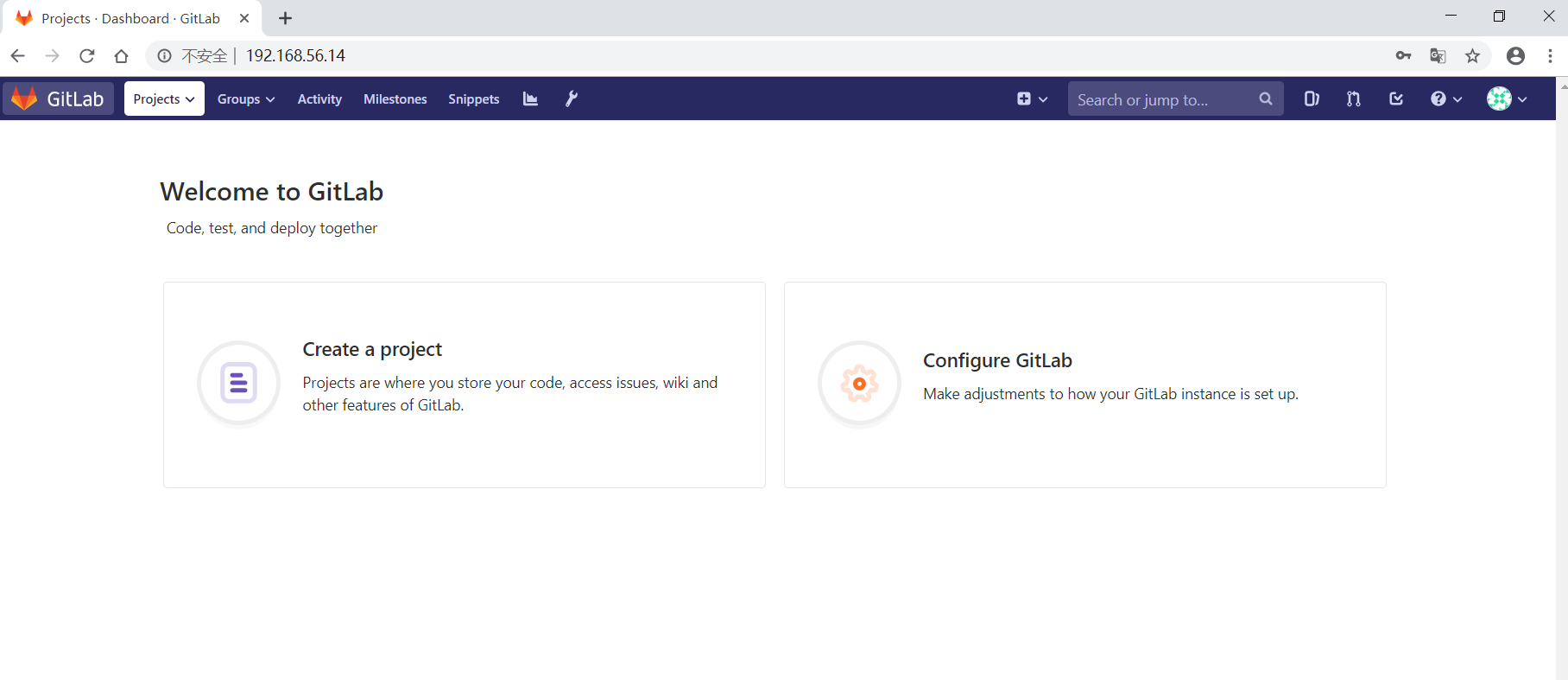
gitlab_index_page.png

新建一个用户:

gitlab_new_user.png

登陆邮箱查看邮件,验证账号:

gitlab_account_was_created_for_you_email.png

重置密码:

gitlab_first_page.png

普通账号登陆:

gitlab_login_page.png

管理员账号新建组(Group)和项目(Project),并添加组成员,并给予开发者权限:
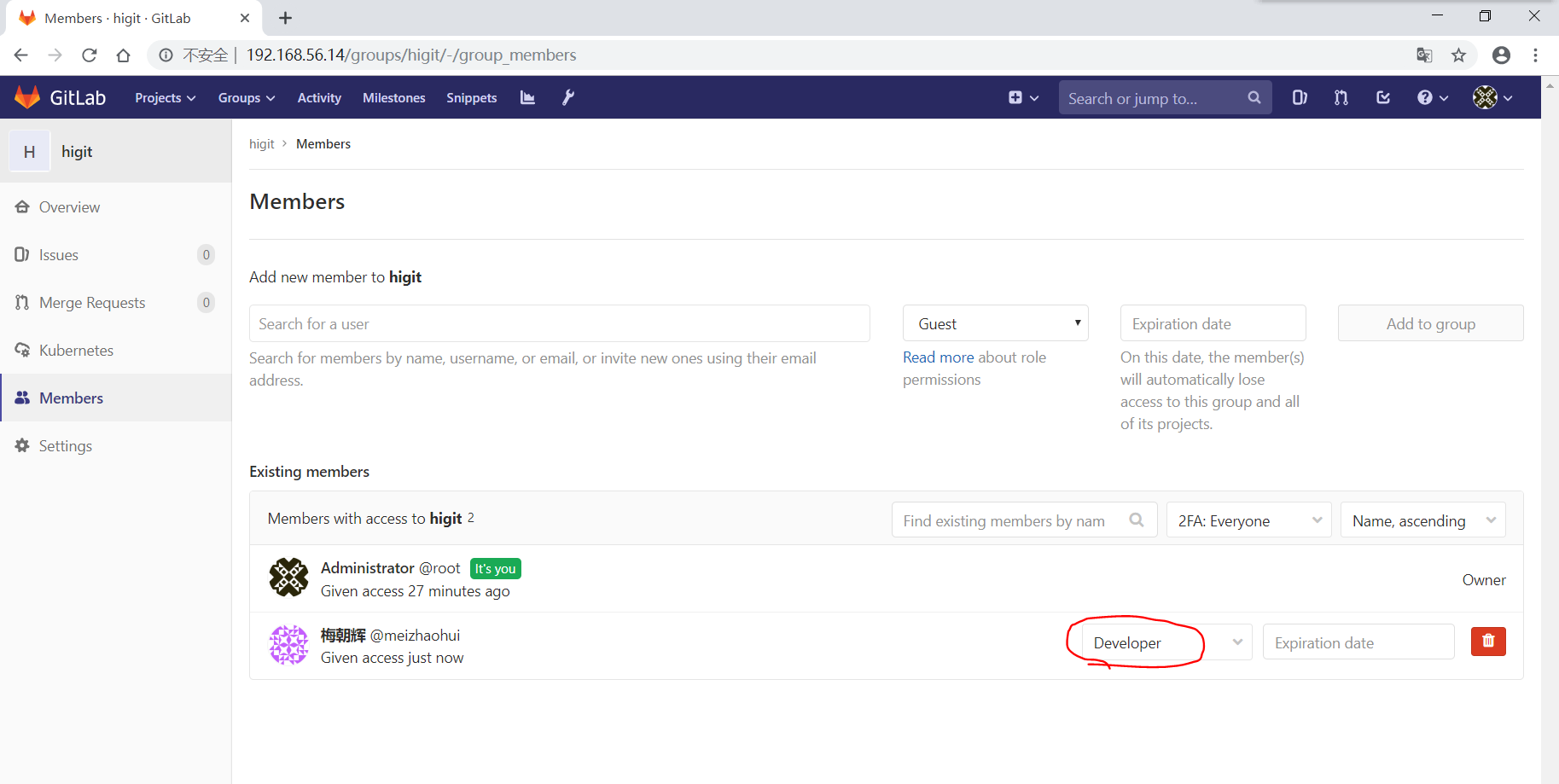
gitlab_add_group_members.png

管理员账号将普通账号加入到项目中后,普通用户就可以看到相应的项目:

gitlab_project.png

  • 在服务器上面创建一个普通用户,并切换到普通用户下,然后创建SSH KEY
 1
 2
 3
 4
 5
 6
 7
 8
 9
10
11
12
13
14
15
16
17
18
19
20
21
22
23
24
25
26
27
28
[root@server ~]# useradd meizhaohui
[root@server ~]# su meizhaohui
[meizhaohui@server root]$ cd
[meizhaohui@server ~]$ pwd
/home/meizhaohui
[meizhaohui@server ~]$ ssh-keygen -C mzh.whut@gmail.com
Generating public/private rsa key pair.
Enter file in which to save the key (/home/meizhaohui/.ssh/id_rsa): 
Enter passphrase (empty for no passphrase): 
Enter same passphrase again: 
Your identification has been saved in /home/meizhaohui/.ssh/id_rsa.
Your public key has been saved in /home/meizhaohui/.ssh/id_rsa.pub.
The key fingerprint is:
SHA256:SVQoFdXPLdjWpnZ4QomX5l23p3vfWLSEAIetcM3bV4U mzh.whut@gmail.com
The key's randomart image is:
+---[RSA 2048]----+
|       .+*Bo   .o|
|      .o.oo+. E .|
|       .+ ..o* =.|
|       . o .+.&.*|
|        S    B.B=|
|              Bo*|
|             . *o|
|              .oo|
|              oo+|
+----[SHA256]-----+
[meizhaohui@server ~]$ cat ~/.ssh/id_rsa.pub 
ssh-rsa AAAAB3NzaC1yc2EAAAADAQABAAABAQC1pm04LLmCaiLeapPKgMvCsl2XC1M1GR4R1pHvqfzwWMGMo41PfrJ7FXO2+76VvsU4iMUStIxEu/auZjPhWtHdltF+cXdbyvBKljJhlHwRlJTqaWn1WUZrKU473JuZ2CBUnTnCSN3AO7OTMK2V2JLZSCclyrlABvAbpoqW9h2+1wmfCgDZOd+Kw7el5gdrMzFr6I56AGaFel+9H1Lzd2YJ/XXaqOAS9PaI/yFcm9qUY/VbPl7aCfqbul8k4aCa6f9LcSZH2hloReGFvykcNRNjm470xsVfxNI+9GHWzgYoaJT6XneWnusa5KhYejk9HhqMn9kcnDnKQJO8f48MWzLp mzh.whut@gmail.com
  • 普通用户在WEB界面添加SSH KEY

gitlab_add_ssh_key.png

  • 配置git环境
1
2
3
4
5
6
7
[meizhaohui@server ~]$ git config --global --list
fatal: unable to read config file '/home/meizhaohui/.gitconfig': No such file or directory
[meizhaohui@server ~]$ git config --global user.name "Zhaohui Mei"
[meizhaohui@server ~]$ git config --global user.email "mzh.whut@gmail.com"
[meizhaohui@server ~]$ git config --global --list
user.name=Zhaohui Mei
user.email=mzh.whut@gmail.com
  • 克隆下载项目文件
 1
 2
 3
 4
 5
 6
 7
 8
 9
10
11
12
13
14
15
16
17
18
19
20
21
22
23
24
25
26
[meizhaohui@server ~]$ git clone git@192.168.56.14:higit/hellopython.git
Cloning into 'hellopython'...
The authenticity of host '192.168.56.14 (192.168.56.14)' can't be established.
ECDSA key fingerprint is SHA256:7rw7b1vOEC5UmjDAbdIJ6SCK4aoGk5e+48vi3ubjdjE.
ECDSA key fingerprint is MD5:96:39:70:28:72:73:f5:34:61:6f:b6:37:da:90:58:48.
Are you sure you want to continue connecting (yes/no)? yes
Warning: Permanently added '192.168.56.14' (ECDSA) to the list of known hosts.
remote: Enumerating objects: 3, done.
remote: Counting objects: 100% (3/3), done.
remote: Total 3 (delta 0), reused 0 (delta 0)
Receiving objects: 100% (3/3), done.
[meizhaohui@server ~]$ ls
hellopython
[meizhaohui@server ~]$ cd hellopython/
[meizhaohui@server hellopython]$ git remote -v
origin  git@192.168.56.14:higit/hellopython.git (fetch)
origin  git@192.168.56.14:higit/hellopython.git (push)
[meizhaohui@server hellopython]$ git branch
* master
[meizhaohui@server hellopython]$ git log 
commit 78eb18c2c78eaed906dddfcdbddafa1f575a73ab (HEAD -> master, origin/master, origin/HEAD)
Author: Administrator <mzh_love_linux@163.com>
Date:   Sun Jun 23 15:23:00 2019 +0800

    Initial commit
[meizhaohui@server hellopython]$
  • 提交修改
 1
 2
 3
 4
 5
 6
 7
 8
 9
10
11
12
13
14
15
16
17
18
19
20
21
22
23
24
25
26
[meizhaohui@server hellopython]$ git diff
diff --git a/README.md b/README.md
index e859add..ef146f3 100644
--- a/README.md
+++ b/README.md
@@ -1,3 +1,6 @@
 # hellopython
 
-hello Python
\ No newline at end of file
+hello Python
+
+add by ssh method!
+
[meizhaohui@server hellopython]$ git add -A
[meizhaohui@server hellopython]$ git commit -m"add by ssh method"
[master b871965] add by ssh method
 1 file changed, 4 insertions(+), 1 deletion(-)
[meizhaohui@server hellopython]$ git push origin master:master
Counting objects: 3, done.
Writing objects: 100% (3/3), 288 bytes | 288.00 KiB/s, done.
Total 3 (delta 0), reused 0 (delta 0)
remote: GitLab: You are not allowed to push code to protected branches on this project.
To 192.168.56.14:higit/hellopython.git
 ! [remote rejected] master -> master (pre-receive hook declined)
error: failed to push some refs to 'git@192.168.56.14:higit/hellopython.git'

可以发现私有项目,开发人员不能直接合入!

在WEB界面上操作也可以发现无法合入:
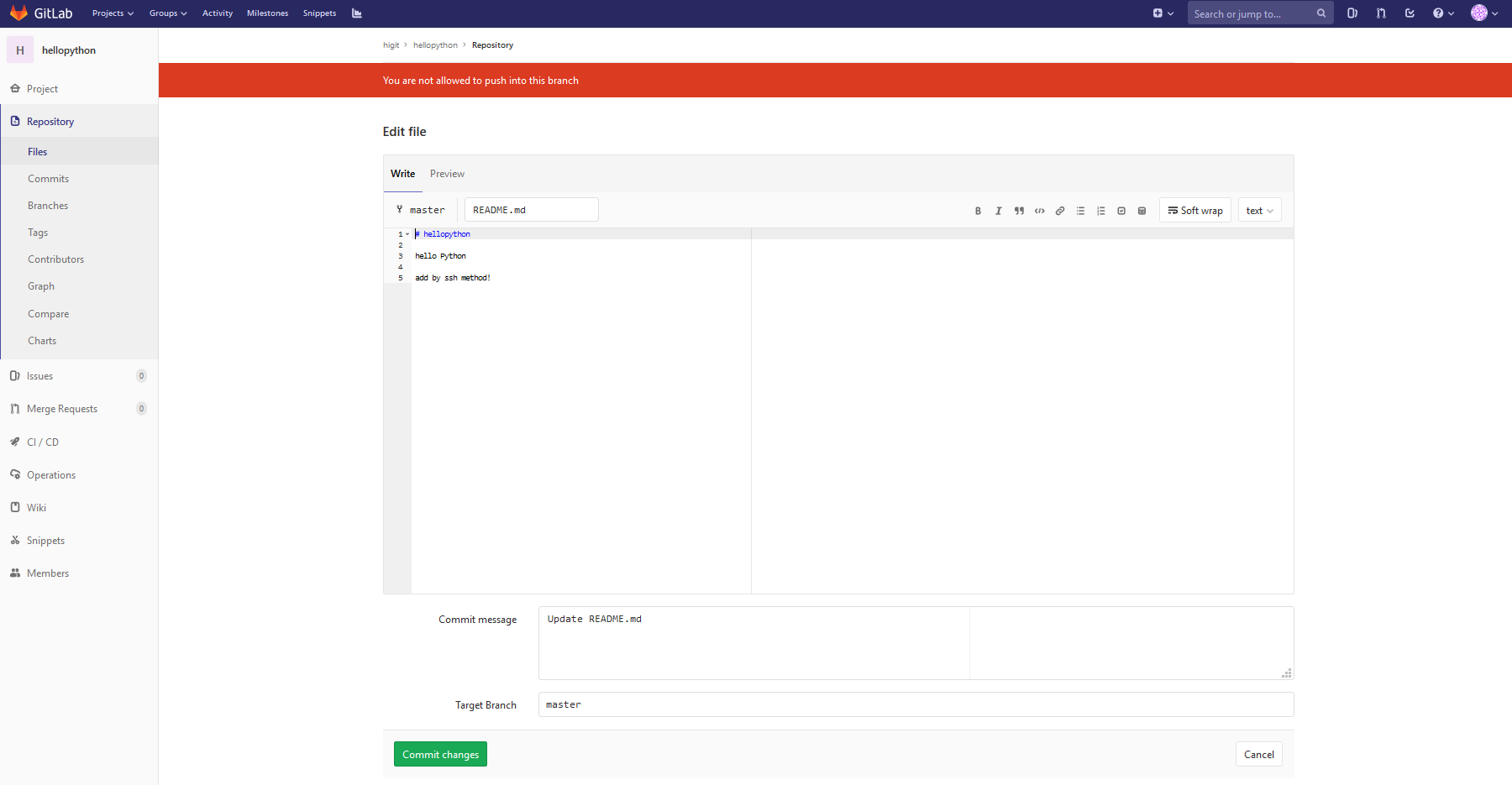
gitlab_not_allowed_to_push.png

  • 通过http方式下载项目文件
 1
 2
 3
 4
 5
 6
 7
 8
 9
10
11
12
13
14
15
16
17
18
19
20
21
22
23
24
25
26
27
28
29
30
31
32
33
34
35
36
37
38
39
40
41
42
43
44
45
[meizhaohui@server ~]$ git clone http://192.168.56.14/higit/hellopython.git http
Cloning into 'http'...
Username for 'http://192.168.56.14': meizhaohui
Password for 'http://meizhaohui@192.168.56.14': 
remote: Enumerating objects: 3, done.
remote: Counting objects: 100% (3/3), done.
remote: Total 3 (delta 0), reused 0 (delta 0)
Unpacking objects: 100% (3/3), done.
[meizhaohui@server ~]$ cd http/
[meizhaohui@server http]$ ls
README.md
[meizhaohui@server http]$ git remote -v
origin  http://192.168.56.14/higit/hellopython.git (fetch)
origin  http://192.168.56.14/higit/hellopython.git (push)
[meizhaohui@server http]$ git branch
* master
[meizhaohui@server http]$ echo -e "\n\nadd by http method" >> README.md 
[meizhaohui@server http]$ git diff
diff --git a/README.md b/README.md
index e859add..219db24 100644
--- a/README.md
+++ b/README.md
@@ -1,3 +1,5 @@
 # hellopython
 
-hello Python
\ No newline at end of file
+hello Python
+
+add by http method
[meizhaohui@server http]$ git add -A
[meizhaohui@server http]$ git commit -m"add by http method"
[master ae5cfef] add by http method
 1 file changed, 3 insertions(+), 1 deletion(-)
[meizhaohui@server http]$ git push origin master:master
Username for 'http://192.168.56.14': meizhaohui
Password for 'http://meizhaohui@192.168.56.14': 
Counting objects: 3, done.
Writing objects: 100% (3/3), 289 bytes | 289.00 KiB/s, done.
Total 3 (delta 0), reused 0 (delta 0)
remote: GitLab: You are not allowed to push code to protected branches on this project.
To http://192.168.56.14/higit/hellopython.git
 ! [remote rejected] master -> master (pre-receive hook declined)
error: failed to push some refs to 'http://192.168.56.14/higit/hellopython.git'
[meizhaohui@server http]$ 

可以发现通过http方式下载的私有项目,开发人员不能直接合入!

  • 为管理员创建SSH KEY
 1
 2
 3
 4
 5
 6
 7
 8
 9
10
11
12
13
14
15
16
17
18
19
20
21
22
23
24
25
26
27
28
29
[root@server ~]# useradd gitlab_admin
[root@server ~]# su gitlab_admin
[gitlab_admin@server root]$ cd
[gitlab_admin@server ~]$ pwd
/home/gitlab_admin
[gitlab_admin@server ~]$ ssh-keygen -C mzh_love_linux@163.com
Generating public/private rsa key pair.
Enter file in which to save the key (/home/gitlab_admin/.ssh/id_rsa): 
Created directory '/home/gitlab_admin/.ssh'.
Enter passphrase (empty for no passphrase): 
Enter same passphrase again: 
Your identification has been saved in /home/gitlab_admin/.ssh/id_rsa.
Your public key has been saved in /home/gitlab_admin/.ssh/id_rsa.pub.
The key fingerprint is:
SHA256:5VmhRdvJx9UG0g13rbExZmDCk/bjcYL3ZlSx0NX6J5M mzh_love_linux@163.com
The key's randomart image is:
+---[RSA 2048]----+
|         ..oB++=@|
|          == *O=@|
|         .o+oo+@o|
|         o.o* *. |
|        S oo B o |
|            . E o|
|             o o.|
|                 |
|                 |
+----[SHA256]-----+
[gitlab_admin@server ~]$ cat ~/.ssh/id_rsa.pub 
ssh-rsa AAAAB3NzaC1yc2EAAAADAQABAAABAQCyfsgcQo7mH3a2Hp48m7re9988v/Jw+Qk7h7g8KP7kRlAe2Z843TNSnLGLkIHIcyEmnfK1pVGgUmJHaA0TZFJ/hiEaeKwDLdkXo9lWW7bhFHN5/IXA+Q44qChnH7KQUvrpf+l0u/V0iuNC0gUiUuiQWkP5F3L3lp5oZLL2JLAsAQt4IyK1N9fzuN5SK8DpXWDNfsqtWNqqFlrxrmKQn0qqmfpdanvjdA0TUQhHNl02lGGbilJto+5Ib7ZoTKDyZ8xto3zhPymXe+/TNkcyo3w2i0RYWH3o2Oe08yT8Lk/zetlAH69l0ET0gQ25FEjSGnBX9fvBfKoiw6N2piaxPVmF mzh_love_linux@163.com

并将公钥加入到SSH KEY配置界面中,忽略。

  • 配置git环境
1
2
3
4
5
[gitlab_admin@server ~]$ git config --global user.name "GitLab Admin"
[gitlab_admin@server ~]$ git config --global user.email "mzh_love_linux@163.com"
[gitlab_admin@server ~]$ git config --global --list
user.name=GitLab Admin
user.email=mzh_love_linux@163.com
  • 通过SSH克隆下载项目文件,并提交修改
 1
 2
 3
 4
 5
 6
 7
 8
 9
10
11
12
13
14
15
16
17
18
19
20
21
22
23
24
25
26
27
28
29
30
31
32
33
34
35
[gitlab_admin@server ~]$ git clone git@192.168.56.14:higit/hellopython.git
Cloning into 'hellopython'...
The authenticity of host '192.168.56.14 (192.168.56.14)' can't be established.
ECDSA key fingerprint is SHA256:7rw7b1vOEC5UmjDAbdIJ6SCK4aoGk5e+48vi3ubjdjE.
ECDSA key fingerprint is MD5:96:39:70:28:72:73:f5:34:61:6f:b6:37:da:90:58:48.
Are you sure you want to continue connecting (yes/no)? yes
Warning: Permanently added '192.168.56.14' (ECDSA) to the list of known hosts.
remote: Enumerating objects: 3, done.
remote: Counting objects: 100% (3/3), done.
remote: Total 3 (delta 0), reused 0 (delta 0)
Receiving objects: 100% (3/3), done.
[gitlab_admin@server ~]$ cd hellopython/
[gitlab_admin@server ~]$ echo "\n\nadd by ssh method" >> README.md 
[gitlab_admin@server hellopython]$ git diff
diff --git a/README.md b/README.md
index e859add..49e0ece 100644
--- a/README.md
+++ b/README.md
@@ -1,3 +1,3 @@
 # hellopython
 
-hello Python
\ No newline at end of file
+hello Python\n\nadd by ssh method
[gitlab_admin@server hellopython]$ git add -A
[gitlab_admin@server hellopython]$ git commit -m"use ssh to add by admin"
[master fbf1163] use ssh to add by admin
 1 file changed, 1 insertion(+), 1 deletion(-)
[gitlab_admin@server hellopython]$ git push origin master:master
Counting objects: 3, done.
Writing objects: 100% (3/3), 299 bytes | 299.00 KiB/s, done.
Total 3 (delta 0), reused 0 (delta 0)
To 192.168.56.14:higit/hellopython.git
   78eb18c..fbf1163  master -> master
[gitlab_admin@server hellopython]$ 
  • 通过HTTP方式克隆下载项目文件,并提交修改
 1
 2
 3
 4
 5
 6
 7
 8
 9
10
11
12
13
14
15
16
17
18
19
20
21
22
23
24
25
26
27
28
29
30
31
32
33
34
35
36
37
38
39
40
[gitlab_admin@server ~]$ git clone http://192.168.56.14/higit/hellopython.git http
Cloning into 'http'...
Username for 'http://192.168.56.14': root
Password for 'http://root@192.168.56.14': 
remote: Enumerating objects: 6, done.
remote: Counting objects: 100% (6/6), done.
remote: Compressing objects: 100% (2/2), done.
remote: Total 6 (delta 0), reused 0 (delta 0)
Unpacking objects: 100% (6/6), done.
[gitlab_admin@server ~]$ cd http/
[gitlab_admin@server http]$ ls
README.md
[gitlab_admin@server http]$ cat README.md 
## hellopython

hello Python\n\nadd by ssh method
[gitlab_admin@server http]$ echo -e "\nadd by http method" > README.md 
[gitlab_admin@server http]$ git diff
diff --git a/README.md b/README.md
index 49e0ece..2706707 100644
--- a/README.md
+++ b/README.md
@@ -1,3 +1,2 @@
-# hellopython
 
-hello Python\n\nadd by ssh method
+add by http method
[gitlab_admin@server http]$ git add -A
[gitlab_admin@server http]$ git commit -m"use http to add by admin"
[master de66c91] use http to add by admin
 1 file changed, 1 insertion(+), 2 deletions(-)
[gitlab_admin@server http]$ git push origin master:master
Username for 'http://192.168.56.14': root
Password for 'http://root@192.168.56.14': 
Counting objects: 3, done.
Writing objects: 100% (3/3), 279 bytes | 279.00 KiB/s, done.
Total 3 (delta 0), reused 0 (delta 0)
To http://192.168.56.14/higit/hellopython.git
   fbf1163..de66c91  master -> master
[gitlab_admin@server http]$ 

可以发现项目的owner拥有者可以通过SSH或HTTP方式克隆和PUSH数据到项目中,但通过HTTP方式下载和提交修改时都需要输入用户名和密码。

在WEB界面上可以看到刚才的两次提交:
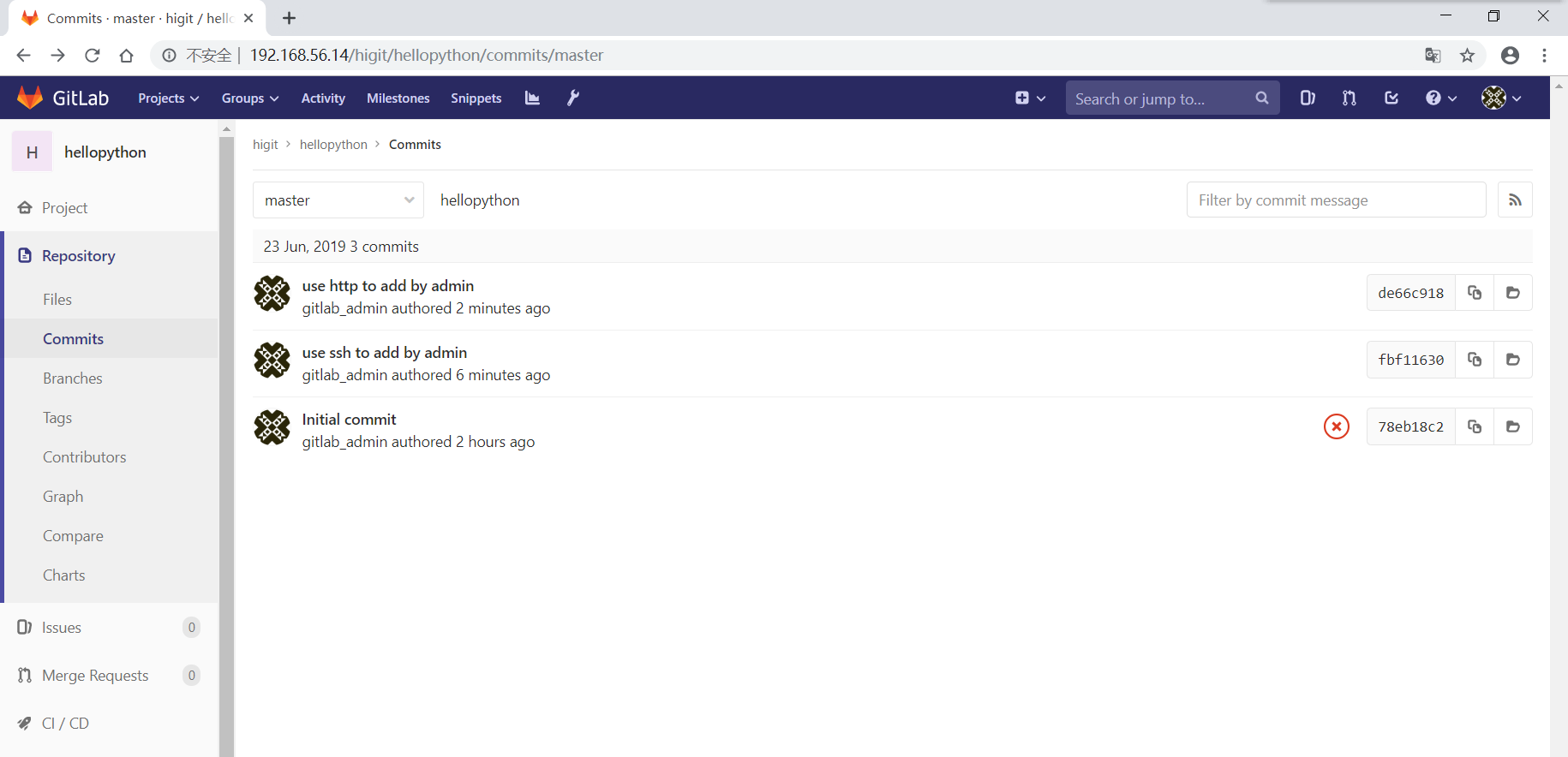
gitlab_check_commits.png

项目成员权限请参考:

项目流水线Pipeline是失败的,需要配置gitlab-runner才能生效,后续补充!

GitLab常用命令

  • 启动服务: gitlab-ctl start
  • 查看状态: gitlab-ctl status
  • 停掉服务: gitlab-ctl stop
  • 重启服务: gitlab-ctl restart
  • 让配置生效: gitlab-ctl reconfigure
  • 查看GitLab版本: cat /opt/gitlab/embedded/service/gitlab-rails/VERSION

初始化GitLab配置文件的脚本文件

download init_gitlab_conf.sh

init_gitlab_conf.sh脚本内容如下:

  1
  2
  3
  4
  5
  6
  7
  8
  9
 10
 11
 12
 13
 14
 15
 16
 17
 18
 19
 20
 21
 22
 23
 24
 25
 26
 27
 28
 29
 30
 31
 32
 33
 34
 35
 36
 37
 38
 39
 40
 41
 42
 43
 44
 45
 46
 47
 48
 49
 50
 51
 52
 53
 54
 55
 56
 57
 58
 59
 60
 61
 62
 63
 64
 65
 66
 67
 68
 69
 70
 71
 72
 73
 74
 75
 76
 77
 78
 79
 80
 81
 82
 83
 84
 85
 86
 87
 88
 89
 90
 91
 92
 93
 94
 95
 96
 97
 98
 99
100
101
102
103
104
105
106
107
108
109
110
111
112
113
114
115
116
117
118
119
120
121
122
123
124
125
126
127
128
129
130
131
132
##!/bin/bash
## Filename: init_gitlab_conf.sh
## Author: Zhaohui Mei
## Email: mzh_love_linux@163.com
## Function: init the configuration /etc/gitlab/gitlab.rb.

#### Note: You need install at first!
#### [root@localhost ~]# rpm -ivh gitlab-ce-11.10.0-ce.0.el7.x86_64.rpm 
#### warning: gitlab-ce-11.10.0-ce.0.el7.x86_64.rpm: Header V4 RSA/SHA1 Signature, key ID f27eab47: NOKEY
#### Preparing...                          ################################# [100%]
#### Updating / installing...
####    1:gitlab-ce-11.10.0-ce.0.el7       ##################                ( 54%)
#### ################################# [100%]
#### 
#### It looks like GitLab has not been configured yet; skipping the upgrade script.
#### 
####        *.                  *.
####       ***                 ***
####      *****               *****
####     .******             *******
####     ********            ********
####    ,,,,,,,,,***********,,,,,,,,,
####   ,,,,,,,,,,,*********,,,,,,,,,,,
####   .,,,,,,,,,,,*******,,,,,,,,,,,,
####       ,,,,,,,,,*****,,,,,,,,,.
####          ,,,,,,,****,,,,,,
####             .,,,***,,,,
####                 ,*,.
####   
#### 
#### 
####      _______ __  __          __
####     / ____(_) /_/ /   ____ _/ /_
####    / / __/ / __/ /   / __ `/ __ \
####   / /_/ / / /_/ /___/ /_/ / /_/ /
####   \____/_/\__/_____/\__,_/_.___/
####   
#### 
#### Thank you for installing GitLab!
#### GitLab was unable to detect a valid hostname for your instance.
#### Please configure a URL for your GitLab instance by setting `external_url`
#### configuration in /etc/gitlab/gitlab.rb file.
#### Then, you can start your GitLab instance by running the following command:
####   sudo gitlab-ctl reconfigure
#### 
#### For a comprehensive list of configuration options please see the Omnibus GitLab readme
#### https://gitlab.com/gitlab-org/omnibus-gitlab/blob/master/README.md

#### Check the GitLab version
#### [root@localhost ~]# cat /opt/gitlab/embedded/service/gitlab-rails/VERSION
#### 11.10.0

#### gitlab configuration init
export LANG="zh_CN.UTF-8"
TIMEZONE="Asia/Shanghai"
gitlab_conf="/etc/gitlab/gitlab.rb"
NOW_TIME=$(date +"%Y%m%d-%H%M%S")
cp "${gitlab_conf}" "${gitlab_conf}".${NOW_TIME}.bak
IP=$(ip a show|grep 192|awk -F'[ /]+' '{print $3}')
TRUSTED_PROXY=$(echo ${IP}|awk -F'.' '{print $1"."$2"."$3}')
GIT_DATA_DIR="/home/git/git-data"
if test -d "${GIT_DATA_DIR}" ; then
    echo "The Folder ${GIT_DATA_DIR} exist"
else
    mkdir -p "${GIT_DATA_DIR}"
fi
chown -R git:root "${GIT_DATA_DIR}"

echo -e "Step 1: set external url"
sed -i "13s@external_url 'http://gitlab.example.com'@external_url \"http://${IP}\"@g" "${gitlab_conf}"

echo -e "Step 2: set Time Zone ans Sync Time to time5.aliyun.com IP:182.92.12.11"
sed -i "49s@^# gitlab_rails\['time_zone'\] = 'UTC'@gitlab_rails\['time_zone'\] = '${TIMEZONE}'@g" "${gitlab_conf}"
yum install ntp && ntpdate 182.92.12.11 && echo "Time Sync Done!"

echo "Step 3: Email Setting"
sed -i "52s@^# gitlab_rails\['gitlab_email_enabled'\] = true@gitlab_rails\['gitlab_email_enabled'\] = true@g" "${gitlab_conf}"
sed -i "53s@^# gitlab_rails\['gitlab_email_from'\] = 'example\@example.com'@gitlab_rails\['gitlab_email_from'\] = 'mzh_love_linux\@163.com'@g" "${gitlab_conf}"
sed -i "54s@^# gitlab_rails\['gitlab_email_display_name'\] = 'Example'@gitlab_rails\['gitlab_email_display_name'\] = 'GitLab'@g" "${gitlab_conf}"
sed -i "55s@^# gitlab_rails\['gitlab_email_reply_to'\] = 'noreply\@example.com'@gitlab_rails\['gitlab_email_reply_to'\] = 'mzh_love_linux\@163.com'@g" "${gitlab_conf}"
sed -i "56s@^# gitlab_rails\['gitlab_email_subject_suffix'\] = ''@gitlab_rails\['gitlab_email_subject_suffix'\] = '[GitLab]'@g" "${gitlab_conf}"

echo -e "Step 4: Disallow users creating top-level groups"
sed -i "59s@# gitlab_rails\['gitlab_default_can_create_group'\] = true@gitlab_rails\['gitlab_default_can_create_group'\] = false@g" "${gitlab_conf}"

echo -e "Step 5: Disallow users changing usernames"
sed -i "60s@# gitlab_rails\['gitlab_username_changing_enabled'\] = true@gitlab_rails\['gitlab_username_changing_enabled'\] = false@g" "${gitlab_conf}"

echo -e "Step 6: Configuring GitLab trusted_proxies"
sed -i "113s@^# gitlab_rails\['trusted_proxies'\] = \[\]@gitlab_rails['trusted_proxies'] = \['${TRUSTED_PROXY}.0/24'\]@g" "${gitlab_conf}"

echo -e "Step 7: Git data dirs Settings"
sed -i "380s@^# git_data_dirs@git_data_dirs@g" "${gitlab_conf}"
sed -i "381s@^#   \"default@    \"default@g" "${gitlab_conf}"
sed -i "382s@^#     \"path\" => \"/mnt/nfs-01/git-data\"@        \"path\" => \"/home/git/git-data\"@g" "${gitlab_conf}"
sed -i "383s@^#    }@    }@g" "${gitlab_conf}"
sed -i "384s@^# })@})@g" "${gitlab_conf}"

echo -e "Step 8: SMTP settings"
sed -i "511s@# gitlab_rails\['smtp_enable'\] = true@gitlab_rails\['smtp_enable'\] = true@g" "${gitlab_conf}"
sed -i "512s@# gitlab_rails\['smtp_address'\] = \"smtp.server\"@gitlab_rails\['smtp_address'\] = \"smtp.163.com\"@g" "${gitlab_conf}"
sed -i "513s@# gitlab_rails\['smtp_port'\] = 465@gitlab_rails\['smtp_port'\] = 465@g"  "${gitlab_conf}"
sed -i "514s@# gitlab_rails\['smtp_user_name'\] = \"smtp user\"@gitlab_rails\['smtp_user_name'\] = \"mzh_love_linux\@163.com\"@g"  "${gitlab_conf}"
sed -i "515s@# gitlab_rails\['smtp_password'\] = \"smtp password\"@gitlab_rails\['smtp_password'\] = \"authCode\"@g"  "${gitlab_conf}"
sed -i "516s@# gitlab_rails\['smtp_domain'\] = \"example.com\"@gitlab_rails\['smtp_domain'\] = \"163.com\"@g"  "${gitlab_conf}"
sed -i "517s@# gitlab_rails\['smtp_authentication'\] = \"login\"@gitlab_rails\['smtp_authentication'\] = \"login\"@g"  "${gitlab_conf}"
sed -i "518s@# gitlab_rails\['smtp_enable_starttls_auto'\] = true@gitlab_rails\['smtp_enable_starttls_auto'\] = true@g"  "${gitlab_conf}"
sed -i "519s@# gitlab_rails\['smtp_tls'\] = false@gitlab_rails\['smtp_tls'\] = true@g"  "${gitlab_conf}"

echo -e "Step 9: GitLab User Settings"
sed -i "653s@^# user\['username'\]@user\['username'\]@g" "${gitlab_conf}"
sed -i "654s@^# user\['group'\]@user\['group'\]@g" "${gitlab_conf}"
sed -i "662s@^# user\['home'\] = \"/var/opt/gitlab\"@user\['home'\] = \"/home/git\"@g" "${gitlab_conf}"
sed -i "665s@^# user\['git_user_email'\] = \"gitlab\@#{node\['fqdn'\]}\"@user\['git_user_email'\] = \"mzh_love_linux\@163.com\"@g" "${gitlab_conf}"

echo -e "Step 10: Set the username of the non-bundled web-server user"
sed -i "970s@^# web_server\['external_users'\] = \[\]@web_server\['external_users'\] = \['nginx', 'root'\]@g" "${gitlab_conf}"
sed -i "971s@^# web_server\['username'\] = 'gitlab-www'@web_server\['username'\] = 'nginx'@g" "${gitlab_conf}"
sed -i "972s@^# web_server\['group'\] = 'gitlab-www'@web_server\['group'\] = 'nginx'@g" "${gitlab_conf}"

echo -e "Step 11: Disable bundled Nginx"
sed -i "983s@^# nginx\['enable'\] = true@nginx\['enable'\] = false@g" "${gitlab_conf}"
echo -e "OK. Great Done!!!"

echo -e "=============================================================="
echo -e "You can run the command to test the configuration"
echo -e "Start the gitlab-runsvdir: systemctl start gitlab-runsvdir"
echo -e "Start the gitlab: gitlab-ctl reconfigure"
echo -e "Start the gitlab: gitlab-ctl start"
echo -e "modiry the Nginx configuration"
echo -e "Start the nginx: systemctl start nginx"

参考:

Licensed under the GNU General Public License v3.0