mail邮件模块
1. 概述
2. 参数
| 参数 | 描述 |
|---|
| attach list | 邮件附件,默认[] |
| bcc list | 暗抄送,默认[] |
| body string | 邮件主体,默认$subject |
| cc list | 抄送,默认[] |
| charset string | 邮件编码,默认utf-8 |
| from string | 邮件发送人,默认root |
| headers list | 追加的头部信息 |
| host string | 邮件服务器,默认localhost |
| password string | SMTP邮件服务器密码 |
| port integer | 邮件服务器端口号,默认25 ,有效端口号范围[1, 65534] |
| secure string | 安全协议,可选值:always加密连接;never不使用SSL/TLS协议;starttls尝试SSL/TLS协议连接,如果不能这样则会失败;try尝试使用SSL/TLS协议连接,如果不能这样但不失败 |
| subject string | 邮件主题,必须字段 |
| subtype string | 类型,使用html还是默认的plain普通文本 |
| timeout integer | 超时时间,默认20秒 |
| to list | 收件人,默认root |
| username string | SMTP邮件服务器用户名 |
3. 官方示例
 1
 2
 3
 4
 5
 6
 7
 8
 9
10
11
12
13
14
15
16
17
18
19
20
21
22
23
24
25
26
27
28
29
30
31
32
33
34
35
36
37
38
39
40
41
42
43
44
45
46
47
48
49
50
51
52
53
54
55
56
57
58
59
60
61
| - name: Example playbook sending mail to root
mail:
subject: System {{ ansible_hostname }} has been successfully provisioned.
delegate_to: localhost
- name: Sending an e-mail using Gmail SMTP servers
mail:
host: smtp.gmail.com
port: 587
username: username@gmail.com
password: mysecret
to: John Smith <john.smith@example.com>
subject: Ansible-report
body: System {{ ansible_hostname }} has been successfully provisioned.
delegate_to: localhost
- name: Send e-mail to a bunch of users, attaching files
mail:
host: 127.0.0.1
port: 2025
subject: Ansible-report
body: Hello, this is an e-mail. I hope you like it ;-)
from: jane@example.net (Jane Jolie)
to:
- John Doe <j.d@example.org>
- Suzie Something <sue@example.com>
cc: Charlie Root <root@localhost>
attach:
- /etc/group
- /tmp/avatar2.png
headers:
- Reply-To=john@example.com
- X-Special="Something or other"
charset: us-ascii
delegate_to: localhost
- name: Sending an e-mail using the remote machine, not the Ansible controller node
mail:
host: localhost
port: 25
to: John Smith <john.smith@example.com>
subject: Ansible-report
body: System {{ ansible_hostname }} has been successfully provisioned.
- name: Sending an e-mail using Legacy SSL to the remote machine
mail:
host: localhost
port: 25
to: John Smith <john.smith@example.com>
subject: Ansible-report
body: System {{ ansible_hostname }} has been successfully provisioned.
secure: always
- name: Sending an e-mail using StartTLS to the remote machine
mail:
host: localhost
port: 25
to: John Smith <john.smith@example.com>
subject: Ansible-report
body: System {{ ansible_hostname }} has been successfully provisioned.
secure: starttls
|
4. 剧本的使用
4.1 向ansible主机发送邮件
编写剧本文件mail.yml:
1
2
3
4
5
6
| - hosts: node1
tasks:
- name: Example playbook sending mail to root
mail:
subject: System {{ ansible_hostname }} has been successfully provisioned.
delegate_to: localhost
|
注意此处的delegate_to: localhost表示任务委派/代理,即最后由ansible主机发送邮件通知。
在执行剧本前,切换到root账号,查看mail邮件信息:
1
2
3
| [root@master ~]# mail
No mail for root
[root@master ~]#
|
可以看到,此时没有邮件。
检查剧本文件并执行:
 1
 2
 3
 4
 5
 6
 7
 8
 9
10
11
12
13
14
15
16
| [ansible@master ansible_playbooks]$ ansible-lint mail.yml
[ansible@master ansible_playbooks]$ ansible-playbook mail.yml -v
Using /etc/ansible/ansible.cfg as config file
PLAY [node1] ***********************************************************************************************************
TASK [Gathering Facts] *************************************************************************************************
ok: [node1]
TASK [Example playbook sending mail to root] ***************************************************************************
ok: [node1 -> localhost] => {"changed": false, "msg": "Mail sent successfully", "result": {}}
PLAY RECAP *************************************************************************************************************
node1 : ok=2 changed=0 unreachable=0 failed=0 skipped=0 rescued=0 ignored=0
[ansible@master ansible_playbooks]$
|
此时切换到root账号,查看邮件信息:
 1
 2
 3
 4
 5
 6
 7
 8
 9
10
11
12
13
14
15
16
17
18
19
20
21
22
23
24
25
26
| [root@master ~]# mail
Heirloom Mail version 12.5 7/5/10. Type ? for help.
"/var/spool/mail/root": 1 message 1 new
>N 1 root@master.loca Tue Nov 8 20:35 28/984 "System node1 has been successfully provisioned."
& next
Message 1:
From root@kmaster.localdomain Tue Nov 8 20:35:27 2022
Return-Path: <root@master.localdomain>
X-Original-To: root
Delivered-To: root@master.localdomain
Content-Type: multipart/mixed; -charset="utf-8";
boundary="===============5024072418243279231=="
From: root@master.localdomain
Date: Tue, 08 Nov 2022 20:35:27 +0800
Subject: System node1 has been successfully provisioned.
X-Mailer: Ansible mail module
To: root@master.localdomain
Cc:
Status: R
Part 1:
Content-Type: text/plain; charset="utf-8"
System node1 has been successfully provisioned.
&
|
通过以上测试,我们通过执行ansible剧本给ansible主机发送了邮件通知。
通常我们更希望能够真的收到一封真实的邮件。
4.2 通过SMTP邮件服务器发送邮件
我们使用阿里云企业邮箱发送邮件。对应的SMTP信息可参考:阿里邮箱IMAP、POP、SMTP地址和端口信息
| 协议 | 服务器地址 | 服务器端口号(常规) | 服务器端口号(加密) |
|---|
| SMTP | smtp.qiye.aliyun.com | 25 | 465 |
推荐您使用加密端口连接,更加安全,使用时请注意加密端口是否已在您的本地电脑和网络中开放。
编写剧本文件:
 1
 2
 3
 4
 5
 6
 7
 8
 9
10
11
12
13
14
15
| - hosts: node1
tasks:
- name: Sending an e-mail using Gmail SMTP servers
mail:
host: smtp.qiye.aliyun.com
port: 465
secure: always
username: notice@hellogitlab.com
# SMTP服务器密码信息,请注意保密
password: securepassword
# from: notice@hellogitlab.com
to: 梅朝辉 <mzh@hellogitlab.com>
subject: Ansible-report
body: System {{ ansible_hostname }} has been successfully provisioned.
delegate_to: localhost
|
此时执行剧本:
 1
 2
 3
 4
 5
 6
 7
 8
 9
10
11
12
13
14
15
16
| [ansible@master ansible_playbooks]$ ansible-playbook mail.yml -v
Using /etc/ansible/ansible.cfg as config file
PLAY [node1] ***********************************************************************************************************
TASK [Gathering Facts] *************************************************************************************************
ok: [node1]
TASK [Sending an e-mail using Gmail SMTP servers] **********************************************************************
An exception occurred during task execution. To see the full traceback, use -vvv. The error was: SMTPSenderRefused: (500, 'Error: bad syntax', 'root')
fatal: [node1 -> localhost]: FAILED! => {"changed": false, "msg": "Failed to send mail to 'mzh@hellogitlab.com': (500, 'Error: bad syntax', 'root')", "rc": 1}
PLAY RECAP *************************************************************************************************************
node1 : ok=1 changed=0 unreachable=0 failed=1 skipped=0 rescued=0 ignored=0
[ansible@master ansible_playbooks]$
|
可以看到,发送失败,原因是我们没有设置发件人,我们将第10行的from: notice@hellogitlab.com配置打开:
 1
 2
 3
 4
 5
 6
 7
 8
 9
10
11
12
13
14
15
| - hosts: node1
tasks:
- name: Sending an e-mail using Gmail SMTP servers
mail:
host: smtp.qiye.aliyun.com
port: 465
secure: always
username: notice@hellogitlab.com
# SMTP服务器密码信息,请注意保密
password: securepassword
from: notice@hellogitlab.com
to: 梅朝辉 <mzh@hellogitlab.com>
subject: Ansible-report
body: System {{ ansible_hostname }} has been successfully provisioned.
delegate_to: localhost
|
此时再执行剧本:
 1
 2
 3
 4
 5
 6
 7
 8
 9
10
11
12
13
14
15
16
| [ansible@master ansible_playbooks]$ ansible-lint mail.yml
[ansible@master ansible_playbooks]$ ansible-playbook mail.yml -v
Using /etc/ansible/ansible.cfg as config file
PLAY [node1] ***********************************************************************************************************
TASK [Gathering Facts] *************************************************************************************************
ok: [node1]
TASK [Sending an e-mail using Gmail SMTP servers] **********************************************************************
ok: [node1 -> localhost] => {"changed": false, "msg": "Mail sent successfully", "result": {}}
PLAY RECAP *************************************************************************************************************
node1 : ok=2 changed=0 unreachable=0 failed=0 skipped=0 rescued=0 ignored=0
[ansible@master ansible_playbooks]$
|
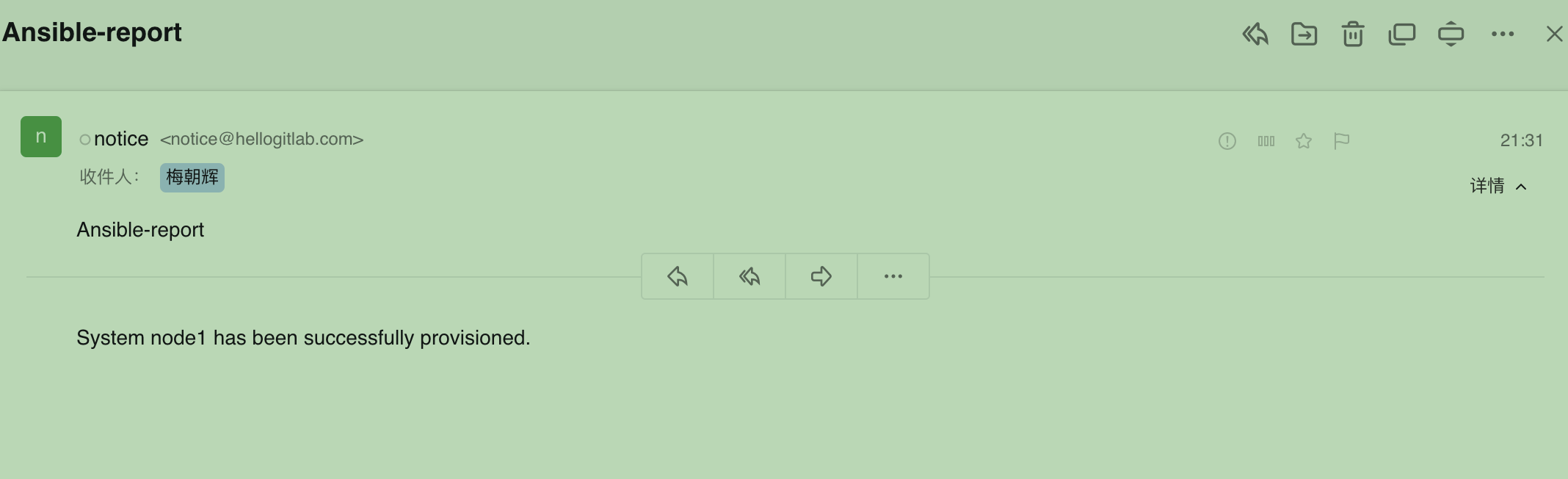
登陆邮箱服务器网页端,可以查看最新的邮件,可以看到,已经收到邮件了:
你可以参照官方示例,结合实际应用场景给用户或管理员发送邮件通知,方便对剧本进行跟踪并及时进行后续操作。